











Development Link & Training
Good afternoon Lori,
We have reached the point in the development process in which we share the link to the development site with you.
Training
The first training session typically takes ~2 hours and is done remotely via Diocesan's version of TeamViewer. At the beginning of our phone call, I will walk you through how to set up the remote access program.
During the training sessions, we go over:
- How to edit the homepage content
- How to edit the footer
- How to edit the menu
- How to create/edit/use image galleries
- How to create/edit/use online forms
- Any other questions that you may have
Since this can be a lot, we break the training down into two sessions:
- Editing the site basics (pages, menu, homepage, footer)
- Editing the additional site features & answering follow-up questions (forms, galleries, etc.)
This is completely up to your learning pace and how much you feel comfortable covering at once.
Development Site Link
Something to keep in mind is that the site is not quite completed yet, with the largest thing being mobile responsiveness. That said, it is best to look at the development site on a desktop computer, rather than a laptop or smaller screen. Mobile development/responsiveness is something that the developer completes after the training so that he can update any changes along with the original development!
There are some other big items that we are still working on, such as:
- Footer Buttons
- Footer "Back to Top" arrow
Other than that, if you see anything that alarms you (design or functionality), please let me know and we can address your concerns.
https://saccfl.diocesanweb.org/hall/
Please let me know what dates and times work best for the training or if you have any other questions,
https://saccfl.diocesanweb.org/hall/
Please let me know what dates and times work best for the training or if you have any other questions,
Cody Armock
Web Department, Diocesan
877-923-0777
877-923-0777
 Lori Adelfio
Good morning,
Was there something else I needed to do or content I needed to send you regarding the Celebration Hall web site? I looked at the site map you sent and it looked fine. I made one or two notes and updated.
How is the progress for the parish site coming along?
Was there something else I needed to do or content I needed to send you regarding the Celebration Hall web site? I looked at the site map you sent and it looked fine. I made one or two notes and updated.
How is the progress for the parish site coming along?
 Cody Armock
Hello Lori,
There was not anything else that we needed for Celebration Hall to my knowledge.
The parish site is coming along, the content has been migrated over and we will be sending out the development link to you tomorrow for you to look over the site.
Thank you,
Cody Armock
There was not anything else that we needed for Celebration Hall to my knowledge.
The parish site is coming along, the content has been migrated over and we will be sending out the development link to you tomorrow for you to look over the site.
Thank you,
Cody Armock
Lori Adelfio
Great! I just wanted to be sure you weren't waiting on anything from me and I dropped the ball.
Looking forward to seeing the two sites. Thank you and God bless!
Looking forward to seeing the two sites. Thank you and God bless!
Cody Armock
No worries, Lori,
Everything is good! Did you have a time in mind for the first training? Possibly next week or the week following?
Cody Armock
Everything is good! Did you have a time in mind for the first training? Possibly next week or the week following?
Cody Armock
Lori Adelfio
I'd say probably not next week, but the week after? Perhaps the 20th? 1pm? Let me know what is good for your team the week of the 18th?
Thank you!
Thank you!
Cody Armock
Sounds good Lori,
I have set up the meeting info for the 20th at 1 pm.
Here is the meeting information:
Diocesan is inviting you to a scheduled Zoom meeting.
Topic: First Training | Anastasia (St. Augustine, FL)
Time: Nov 20, 2019 01:00 PM Eastern Time (US and Canada)
Join Zoom Meeting
https://zoom.us/j/134256604
Meeting ID: 134 256 604
Call to Join Audio
+1 646 876 9923
Meeting ID: 134 256 604
Let me know if you have any questions or if anything changes!
Thank you,
Cody Armock
Web Department, Diocesan
877-923-0777
877-923-0777
Cody Armock
Good morning Lori,
We have reached the point in the development process in which we share the link to the development site with you. First, I wanted to go over the missing content from the website and then get into the training and development site.
Things We Need From You
We do still need some information from you, if possible. Otherwise, we can simply remove these items from the main menu and website.
- Calendar Information (Google Calendar works best). We need the calendar to be made public and then we need the calendar id. For the second link, in the Integrate Calendar section, just send us the text under "Calendar ID" that ends with "@gmail.com".
Training
The first training session typically takes ~2 hours and is done remotely via Diocesan's version of TeamViewer. At the beginning of our phone call, I will walk you through how to set up the remote access program.
During the training sessions, we go over:
- How to edit the homepage content
- How to edit the footer
- How to edit the menu
- How to create/edit/use image galleries
- How to create/edit/use online forms
- Any other questions that you may have
Since this can be a lot, we break the training down into two sessions:
- Editing the site basics (pages, menu, homepage, footer)
- Editing the additional site features & answering follow-up questions (forms, galleries, etc.)
This is completely up to your learning pace and how much you feel comfortable covering at once.
Development Site Link
Something to keep in mind is that the site is not quite completed yet, with the largest thing being mobile responsiveness. That said, it is best to look at the development site on a desktop computer, rather than a laptop or smaller screen. Mobile development/responsiveness is something that the developer completes after the training so that he can update any changes along with the original development!
There are some other big items that we are still working on, such as:
- Image Button Alignment
- Menu look
- Menu Hover
- Homepage Resources Section
Other than that, if you see anything that alarms you (design or functionality), please let me know and we can address your concerns.
https://sacc.diocesanweb.org/
Please let me know what dates and times work best for the training or if you have any other questions,
https://sacc.diocesanweb.org/
Please let me know what dates and times work best for the training or if you have any other questions,
Cody Armock
Web Department, Diocesan
877-923-0777
877-923-0777
Lori Adelfio
Good morning Cody!
Everything looks great so far. There is just a couple tweaks? Under the "Other Resources" section, I'd like to see if we can change the photos for the hover area. The "Bulletins" photo is fine. But if it's possible to change the other 3? I have attached 4 that I found that I like. Maybe you have photos in your arsenal that are similar?
I do not think, at this time, we'll be going live with a calendar. As as staff we have yet to discuss what will be on the calendar. I would like to create a gmail address for the calendar. calendar@saccfl.org (mailto:calendar@saccfl.org) would me fine. That part has to be done on your end, I believe. Can we load it and leave it blank until we start to fill it?
The music concert schedule should fall under the "Events" icon.
That's all my feedback for now!




Everything looks great so far. There is just a couple tweaks? Under the "Other Resources" section, I'd like to see if we can change the photos for the hover area. The "Bulletins" photo is fine. But if it's possible to change the other 3? I have attached 4 that I found that I like. Maybe you have photos in your arsenal that are similar?
I do not think, at this time, we'll be going live with a calendar. As as staff we have yet to discuss what will be on the calendar. I would like to create a gmail address for the calendar. calendar@saccfl.org (mailto:calendar@saccfl.org) would me fine. That part has to be done on your end, I believe. Can we load it and leave it blank until we start to fill it?
The music concert schedule should fall under the "Events" icon.
That's all my feedback for now!
 Veronica Alvarado
Hi Lori,
I just created a new user on your G Suite with the username calendar@saccfl.org.
The login information has been sent to office@saccfl.org.
Once you have set up the calendar, please make sure the calendar is public and send us the Calendar ID.
Thank you and let us know if you have any calendar questions you'd like to go over during the training session.
Thank you,
Veronica Alvarado
Web Department, Diocesan
877-923-0777
877-923-0777
Lori Adelfio
Hello!
Thank you!
Ok, the calendar ID says: calendar@saccfl.org (mailto:calendar@saccfl.org)
I attached a screenshot of the "Integrate Calendar" field.
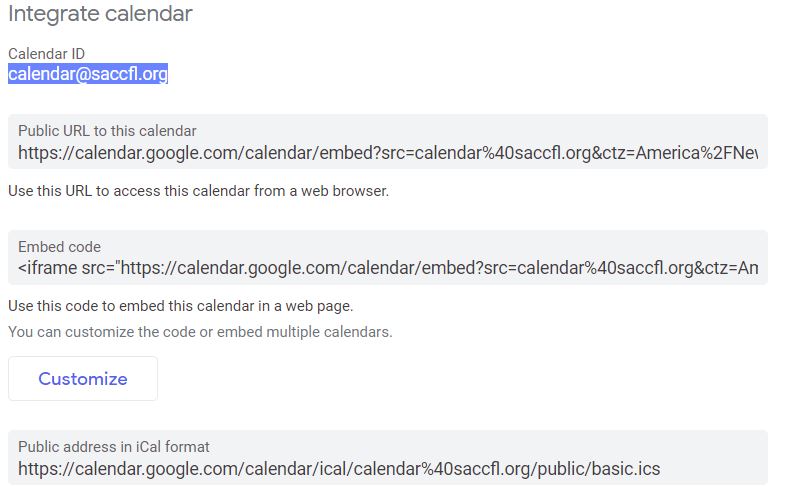
Thank you!
Ok, the calendar ID says: calendar@saccfl.org (mailto:calendar@saccfl.org)
I attached a screenshot of the "Integrate Calendar" field.
Cody Armock
Thank you Lori,
I will update it on the website, so when the events are added to the calendar, they will begin showing up on the website.
Have a great weekend,
Cody Armock
I will update it on the website, so when the events are added to the calendar, they will begin showing up on the website.
Have a great weekend,
Cody Armock
Lori Adelfio
You guys are so great! Thank you! Have a safe weekend!
God bless!
God bless!
Lori Adelfio
Hi Cody,
I hate to do this last minute, but unfortunately, we're short handed in the office today and also need to get the bulletin to you all this week. Can we reschedule for tomorrow morning? If not, maybe Tuesday of next week?
I hate to do this last minute, but unfortunately, we're short handed in the office today and also need to get the bulletin to you all this week. Can we reschedule for tomorrow morning? If not, maybe Tuesday of next week?
Cody Armock
Hi Lori,
Not a problem. Seems like you have your priorities straight.
Yeah, we can do tomorrow. What time works for you? I am free after 9:30 AM EST Tomorrow.
I hope that works.
Cody armock
Not a problem. Seems like you have your priorities straight.
Yeah, we can do tomorrow. What time works for you? I am free after 9:30 AM EST Tomorrow.
I hope that works.
Cody armock
Lori Adelfio
Hi Cody,
9:30 sounds perfect. We have a set of extra hands tomorrow at that time. Thank you SO much for understanding!
9:30 sounds perfect. We have a set of extra hands tomorrow at that time. Thank you SO much for understanding!
Cody Armock
Hi Lori,
You're welcome. It is not a problem.
Here is the updated meeting info for tomorrow.
Diocesan is inviting you to a scheduled Zoom meeting.
Topic: First Training | Anastasia (St. Augustine, FL)
Time: Nov 21, 2019 09:30 AM Eastern Time (US and Canada)
Join Zoom Meeting
https://zoom.us/j/134256604
Meeting ID: 134 256 604
Call to join Audio
+1 646 876 9923
Meeting ID: 134 256 604
Let me know if you have any questions!
Cody Armock
Web Department, Diocesan
877-923-0777
877-923-0777
Cody Armock
Good Afternoon Lori,
I hope you have been well.
I also hope that you have been able to go through the site since the first training and have been able to experiment with it and try things out.
I wanted to see if you had an idea for when you wanted to schedule the second training, where we will cover Gravity Forms and Envira Gallery.
Let me when would be a good time for you and I know that this time of year can be very busy.
Thank you,
Cody Armock
I hope you have been well.
I also hope that you have been able to go through the site since the first training and have been able to experiment with it and try things out.
I wanted to see if you had an idea for when you wanted to schedule the second training, where we will cover Gravity Forms and Envira Gallery.
Let me when would be a good time for you and I know that this time of year can be very busy.
Thank you,
Cody Armock
Lori Adelfio
Good afternoon Cody,
I am currently out on medical leave after having some surgery last week and today going through email when I can. I haven't yet gone into the WP site yet to look around and make any tweaks or updates. I may try and log in tomorrow. I would be happy to schedule something with you but it will have to be after the New Year. Perhaps toward the 3rd or 4th or the following week?
I am currently out on medical leave after having some surgery last week and today going through email when I can. I haven't yet gone into the WP site yet to look around and make any tweaks or updates. I may try and log in tomorrow. I would be happy to schedule something with you but it will have to be after the New Year. Perhaps toward the 3rd or 4th or the following week?
Cody Armock
Good Morning Lori,
I hope the recovery is going well and know of my prayers for you.
That will be fine. I have made a note to follow up about the training on the 27th and have a tentative training set for the 6th, but we can talk about the feasibility of that on the 27th as things progress.
Let me know if you have any questions while going through the site.
Thank you,
Cody Armock
I hope the recovery is going well and know of my prayers for you.
That will be fine. I have made a note to follow up about the training on the 27th and have a tentative training set for the 6th, but we can talk about the feasibility of that on the 27th as things progress.
Let me know if you have any questions while going through the site.
Thank you,
Cody Armock
Cody Armock
Good Morning Lori,
I wanted to reach out to you to see if you had some idea about a date for the second training. I will be out of the office for the rest of the week, but you can still email me back and I will get back to you when I return next Monday. I could do Friday, January 3rd any time before noon, otherwise any time 1/7 through the 10th, between 9:30 and 4 pm. The second training will cover any questions or issues that you have run into and the new topics of Forms and Envira Galleries.
Let me know if you have any questions and have a very Merry Christmas and a Happy New Year if we don't speak before then!
Cody Armock
Web Department, Diocesan
877-923-0777
877-923-0777
Cody Armock
Good Morning Lori,
I have on my calendar that we had a tentative training today at 10 AM. Did you still want to have that second training today or did you want to reschedule?
Let me know!
Thank you,
Cody Armock
Web Department, Diocesan
877-923-0777
877-923-0777
Lori Adelfio
Good morning!
I just arrived back to the office. This week would be fine with me. Is Thursday at 10am convenient for you?
I just arrived back to the office. This week would be fine with me. Is Thursday at 10am convenient for you?
Lori Adelfio
Hello,
Sorry. I'm just getting all of your emails now. I am just arriving back to work, so I'm getting my bearings. I can try and move my morning around if 10am today works better for you.
Sorry. I'm just getting all of your emails now. I am just arriving back to work, so I'm getting my bearings. I can try and move my morning around if 10am today works better for you.
Cody Armock
Hello Lori,
10 am on Thursday would not work for me since I have a training at 11 am, but I could do 9 am on that day if that would work for you, otherwise, I am pretty open on Wednesday.
Let me know if either of those work!
Cody Armock
10 am on Thursday would not work for me since I have a training at 11 am, but I could do 9 am on that day if that would work for you, otherwise, I am pretty open on Wednesday.
Let me know if either of those work!
Cody Armock
Lori Adelfio
9am on Thursday would be great. Thanks so much for your patience and flexibility.
Cody Armock
Hello Lori,
Here is the meeting information for Thursday:
Diocesan is inviting you to a scheduled Zoom meeting.
Topic: Second Training | Anastasia/Celebration Hall (St. Augustine, FL)
Time: Jan 9, 2020 09:00 AM Eastern Time (US and Canada)
Join Zoom Meeting
https://zoom.us/j/807714997
Meeting ID: 807 714 997
Call to Join Audio:
+1 646 876 9923
Meeting ID: 807 714 997
Let me know if you have any questions between now and then!
Cody Armock
Lori Adelfio
Cody,
In this sea of emails, I can't find the one with my log in information. Can you resend it? I want to get reacquainted before the training tomorrow and start looking around again.
In this sea of emails, I can't find the one with my log in information. Can you resend it? I want to get reacquainted before the training tomorrow and start looking around again.
Cody Armock
Hello Lori,
You should have received an email from webdepartment@diocesan.com with a copy of my previous email.
Let me know if you don't get it within a few minutes!
Thank you,
Cody Armock
You should have received an email from webdepartment@diocesan.com with a copy of my previous email.
Let me know if you don't get it within a few minutes!
Thank you,
Cody Armock
Lori Adelfio
Well that's why I couldn't find it! Thank you, I found it =D
Much appreciated!
Much appreciated!
Lori Adelfio
Cody,
I'm not sure what happened, but my Celebration Hall site is empty? I was changing some text, deleted a section (as I've done 1000 times with the old Word Press site and now the site looks nothing like it should?
I'm not sure what happened, but my Celebration Hall site is empty? I was changing some text, deleted a section (as I've done 1000 times with the old Word Press site and now the site looks nothing like it should?
Lori Adelfio
It's back now, but will this be because it's a work in progress?
Lori Adelfio
Hello,
It's happening again? And it's stuff from the church web site? See attached.
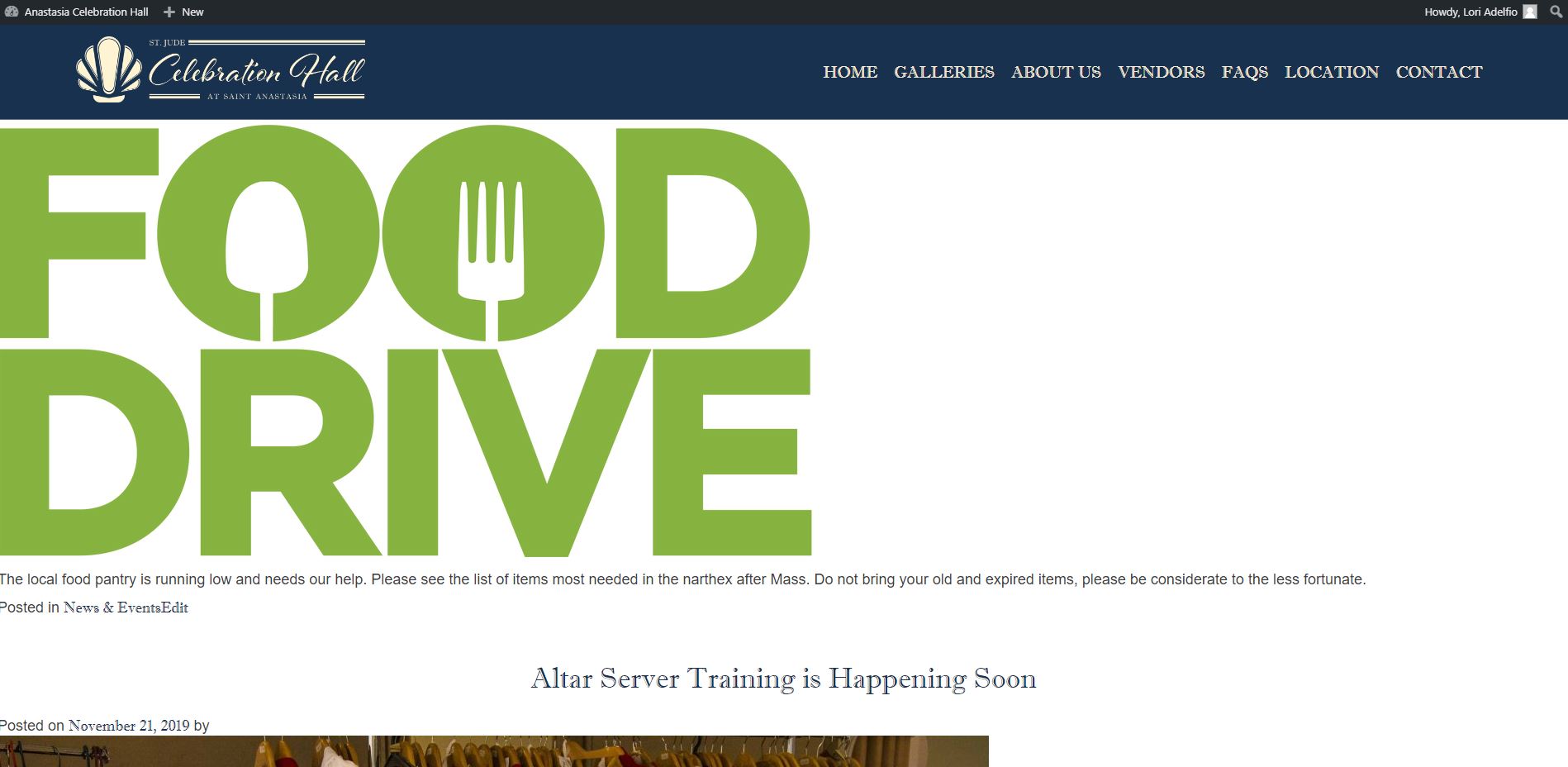
It's happening again? And it's stuff from the church web site? See attached.
Veronica Alvarado
Hello Lori,
I jumped on your website and the settings must have been updated to make the front page of the site display posts.
I have set it back to the "Home" page.
https://ach.diocesanweb.org/
Let me know if there is another issue,
Veronica Alvarado
Project Manager
Web Department, Diocesan
877-923-0777
Web Department, Diocesan
877-923-0777
Lori Adelfio
Thank you for your help!
Veronica Alvarado
Sure thing!
Let me know if it happens again.
Let me know if it happens again.
Veronica Alvarado
Web Department, Diocesan
877-923-0777
877-923-0777
Lori Adelfio
Thank you. I forgot to ask Cody today what URL we purchased for the celebration hall project. Can you remind me? It has been a while!
Cody Armock
Hello Lori,
The URL you purchased for Celebration Hall is staugweddingsandevents.com.
Let me know if you have any other questions!
Cody Armock
Web Department, Diocesan
877-923-0777
877-923-0777
Lori Adelfio
Cody,
God bless your patience! One last thing today, I absolutely PROMISE! Brian can't remember the password for info@saccfl.org (mailto:info@saccfl.org) and I'd like to start setting up some forms. Can you help with this or is that another dept?
God bless your patience! One last thing today, I absolutely PROMISE! Brian can't remember the password for info@saccfl.org (mailto:info@saccfl.org) and I'd like to start setting up some forms. Can you help with this or is that another dept?
Cody Armock
Hello Lori,
I have reset the password for Brian (admin@saccfl.org) accidentally. I forgot about the different email for him. I am so sorry about that. It should have sent an email to you about his new password and he can change it at the next sign in. My sincerest apologies for that mix-up. I have reset the password for info@saccfl.org though so that one can be given to Brian as well. They are the same password for now.
Please tell Brian of my apologies. I saw that he was listed for admin@saccfl.org and so I went ahead with that one by mistake. New Year, New Passwords may be the motto today!
Let me know if you have any issues with this or did not receive either of those emails!
God Bless,
Cody Armock
Web Department, Diocesan
877-923-0777
877-923-0777
Cody Armock
Hi Lori,
Let us know if there are any other domains you'd like us to purchase to redirect to your new site as well. I know the hall has had a slight name change since we first spoke (St. Jude).
For example, here are some domain names that are currently available:
stjudehall.com
stjudehall.org
stjudecelebrationhall.com
stjudecelebrationhall.org
celebrationhallfl.com
celebrationhallfl.org
staugustinehall.com
staugustinehall.org
staugustinecelebration.com
staugustinecelebration.org
Any additional domains would be an additional $15/yr, billed at the same time as your annual hosting fee.
Let me know if you're interested in any of these or would like me to look some up for you.
Cody Armock
Web Department, Diocesan
877-923-0777
877-923-0777
Lori Adelfio
Ha! I like that motto! It's no problem. I already told him I reset his password in error and he'll have to log in tomorrow and change it!
Lori Adelfio
Good morning Cody,
Thanks. I will speak with Brian about the additional URL. Have a formatting conundrum. See attached.
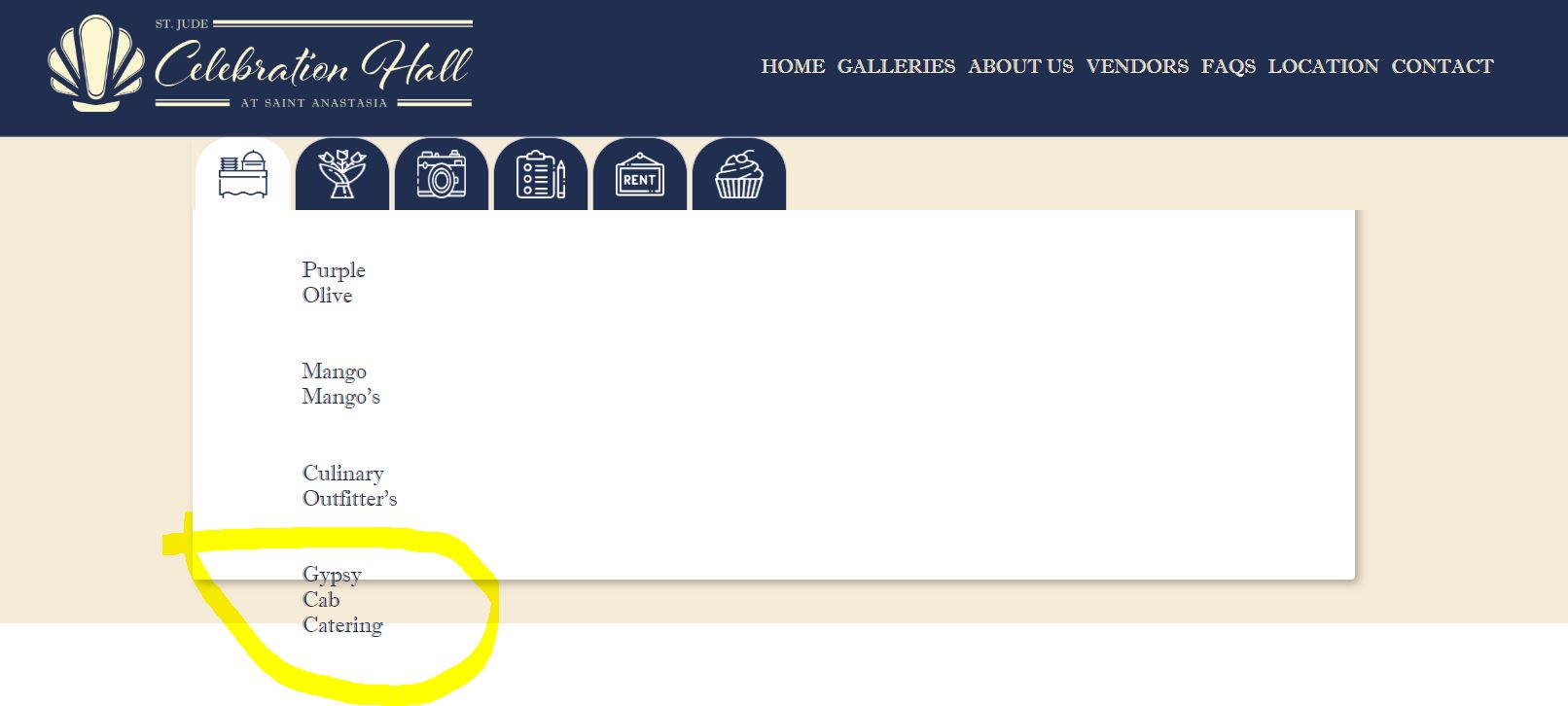
Thanks. I will speak with Brian about the additional URL. Have a formatting conundrum. See attached.
Cody Armock
Hello Lori,
I have made a to-do for the developer to fix that and prevent it from going out of the box. That should be resolved soon.
Thank you and have a great weekend,
Cody Armock
I have made a to-do for the developer to fix that and prevent it from going out of the box. That should be resolved soon.
Thank you and have a great weekend,
Cody Armock
Cody Armock
Good Morning Lori,
Do you have a better idea of when you like to launch the site? We would like to have at least 2 weeks' notice to just make sure that everything is ready by then. We would also like to launch it between Monday and Thursday, that way it gives us another day in the office if anything goes wrong.
Let me know what day works best for you!
Thank you,
Cody Armock
Do you have a better idea of when you like to launch the site? We would like to have at least 2 weeks' notice to just make sure that everything is ready by then. We would also like to launch it between Monday and Thursday, that way it gives us another day in the office if anything goes wrong.
Let me know what day works best for you!
Thank you,
Cody Armock
Lori Adelfio
Hi Cody!
Oh you'll definitely have two weeks notice for sure. With only having one priest here at our parish, the Pastor is very busy so it's difficult to say exactly when. We have a lot of programs starting up. But once he approves things, I'll just announce that two weeks after approval will be when the site will launch. I'm hoping to have things tightened up on the parish site but I have already submitted the Celebration Hall site for his approval. Just waiting on that. Do you have a specific time frame that you need to get this launched by?
Thanks for your patience!
Oh you'll definitely have two weeks notice for sure. With only having one priest here at our parish, the Pastor is very busy so it's difficult to say exactly when. We have a lot of programs starting up. But once he approves things, I'll just announce that two weeks after approval will be when the site will launch. I'm hoping to have things tightened up on the parish site but I have already submitted the Celebration Hall site for his approval. Just waiting on that. Do you have a specific time frame that you need to get this launched by?
Thanks for your patience!
Cody Armock
Hello Lori,
We do not have a specific time frame to get this launched by, I just wanted to bring it up so that we have clarity on both sides and so we have time to make sure the site is ready for launch when that date does come and the site is approved. I understand that this is a busy time and with all those things coming up, I'm sure it can be pretty hectic with so many things vying for the Pastor's attention.
Please keep me updated as things progress there!
Thank you,
Cody Armock
We do not have a specific time frame to get this launched by, I just wanted to bring it up so that we have clarity on both sides and so we have time to make sure the site is ready for launch when that date does come and the site is approved. I understand that this is a busy time and with all those things coming up, I'm sure it can be pretty hectic with so many things vying for the Pastor's attention.
Please keep me updated as things progress there!
Thank you,
Cody Armock
Lori Adelfio
Cody,
Thanks so much. I just wanted to be sure we weren't pushing your timeline to far back. I am much like a goalie trying to push the puck back into play! I'll get it there though!
Thanks so much. I just wanted to be sure we weren't pushing your timeline to far back. I am much like a goalie trying to push the puck back into play! I'll get it there though!
Cody Armock
Lori,
I appreciate the consideration and analogy. Hopefully, the puck scores on the other goal soon. It will get there!
Let me know if you have any questions while editing the site or in general!
Thank you,
Cody Armock
I appreciate the consideration and analogy. Hopefully, the puck scores on the other goal soon. It will get there!
Let me know if you have any questions while editing the site or in general!
Thank you,
Cody Armock
Lori Adelfio
Cody,
👍 Can I bug you for one question? I am drawing a total blank as to how to change the header photo on a page. For instance, Funerals & Columbarium. That's not our parish and I want to place a picture in there that is. I have, alas, forgotten where to go to do that. It's not the same anymore, so I'm trying to get used to the new platform.
Thanks again.
👍 Can I bug you for one question? I am drawing a total blank as to how to change the header photo on a page. For instance, Funerals & Columbarium. That's not our parish and I want to place a picture in there that is. I have, alas, forgotten where to go to do that. It's not the same anymore, so I'm trying to get used to the new platform.
Thanks again.
Cody Armock
Hello Lori,
When editing the page on the right side under the Update/Publish button there is the Document/Block Attribute pane, if you click on the document tab, there will be a item for "Featured Image". You can change the header photo there.
I hope that helps.
Thank you,
Cody Armock
When editing the page on the right side under the Update/Publish button there is the Document/Block Attribute pane, if you click on the document tab, there will be a item for "Featured Image". You can change the header photo there.
I hope that helps.
Thank you,
Cody Armock
Lori Adelfio
Perfect! Thanks!
Lori Adelfio
Good afternoon!
I'm working on changing the photos for the pages on the parish site today. I have tried to get to the "Staff" page, to change the banner, and when I "search" for the staff page, nothing comes up. But there is clearly a staff page on the site.
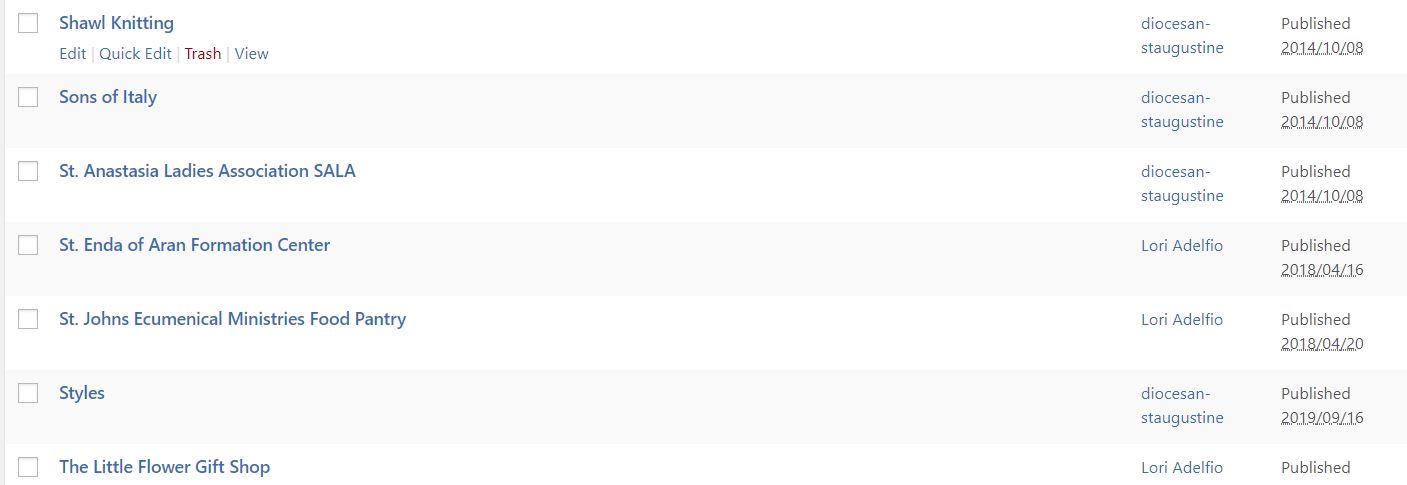
I'm working on changing the photos for the pages on the parish site today. I have tried to get to the "Staff" page, to change the banner, and when I "search" for the staff page, nothing comes up. But there is clearly a staff page on the site.
Cody Armock
Good Morning Lori,
The Staff Page is an archive page and everything on there is dynamically updated through the Staff Member Module. However, if you would like us to change the image, which must be done through the code, we can do that. Just let us know which one you would like us to change it to!
Thank you,
Cody Armock
The Staff Page is an archive page and everything on there is dynamically updated through the Staff Member Module. However, if you would like us to change the image, which must be done through the code, we can do that. Just let us know which one you would like us to change it to!
Thank you,
Cody Armock
Lori Adelfio
Cody,
Ah ha! Ok, I got it. I have to add a "featured image" on the STAFF module on the dashboard. 👍 Thank you!
Ah ha! Ok, I got it. I have to add a "featured image" on the STAFF module on the dashboard. 👍 Thank you!
Lori Adelfio
Good afternoon!
I'm sitting with the staff, department by department, to show them the page and make the tweaks before presenting it to Fr. Tim. I want to have as close to a finished product as I can before he sees it.
I've started making some changes to customize our pages (removing old content and such). I changed the staff photos, but I need to change the header photo on the staff page OR can you replace the "default photo" from the Presbyterian church to the photo attached? This way our church will be the photo people see? I need to change the text on there as well. Adding in office hours, removing the email address and "for further assistance" text. In speaking to some of the staff here, we think adding an icon for "The Gift Shop" on the homepage where the "Join The Parish" "From The Pastors Desk" icons are. Perhaps in between the "Online Giving" and "Celebration Hall" icons? That will be the ONLY change to that line as I explained it is meant to be "minimalist" for a cleaner, more concise, appearance.
One thing I completely forgot to ask you is where will our social media icons be placed on the page?
Thank you!
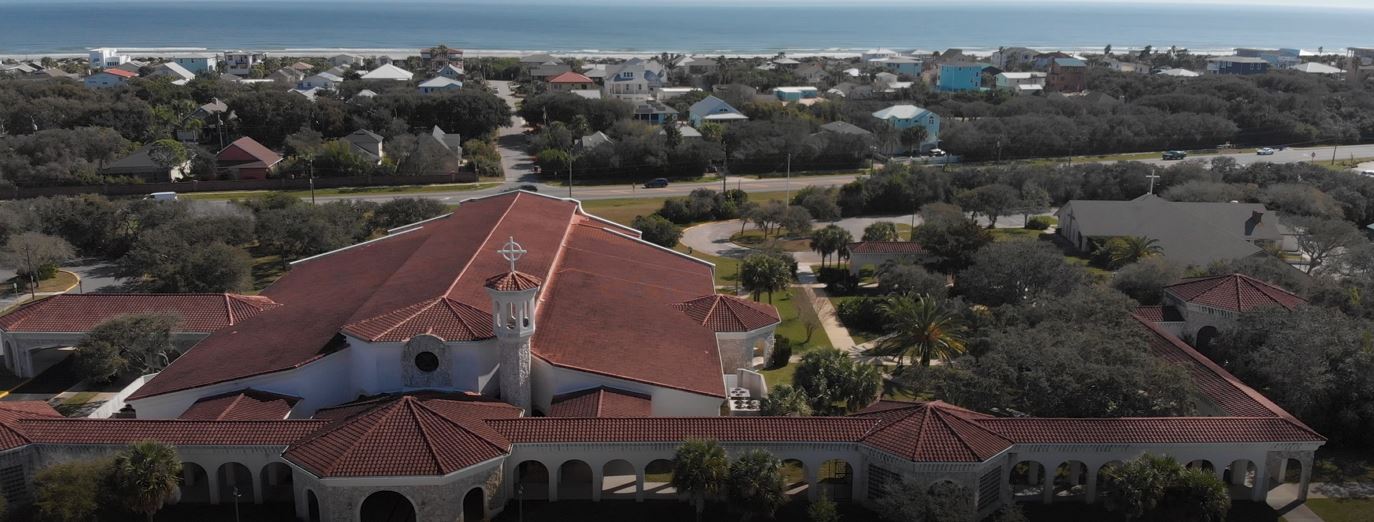
I'm sitting with the staff, department by department, to show them the page and make the tweaks before presenting it to Fr. Tim. I want to have as close to a finished product as I can before he sees it.
I've started making some changes to customize our pages (removing old content and such). I changed the staff photos, but I need to change the header photo on the staff page OR can you replace the "default photo" from the Presbyterian church to the photo attached? This way our church will be the photo people see? I need to change the text on there as well. Adding in office hours, removing the email address and "for further assistance" text. In speaking to some of the staff here, we think adding an icon for "The Gift Shop" on the homepage where the "Join The Parish" "From The Pastors Desk" icons are. Perhaps in between the "Online Giving" and "Celebration Hall" icons? That will be the ONLY change to that line as I explained it is meant to be "minimalist" for a cleaner, more concise, appearance.
One thing I completely forgot to ask you is where will our social media icons be placed on the page?
Thank you!
Cody Armock
Hello Lori,
Staff Header Image
I changed the default featured image in the Theme Settings and changed the one for the page.
Gift Shop to the Homepage
That can be added in the backend of the Homepage and going to the featured links tab. You can reorder the links by clicking on the number on the left side and dragging up or down. You can get the icon from https://flaticon.com, just make sure that it matches the other ones pretty well, download the PNG version of it, since the site has problems with SVG.
Social Media
The social media options appear at the very bottom of the page in the footer. I have attached a screenshot to indicate where they are.
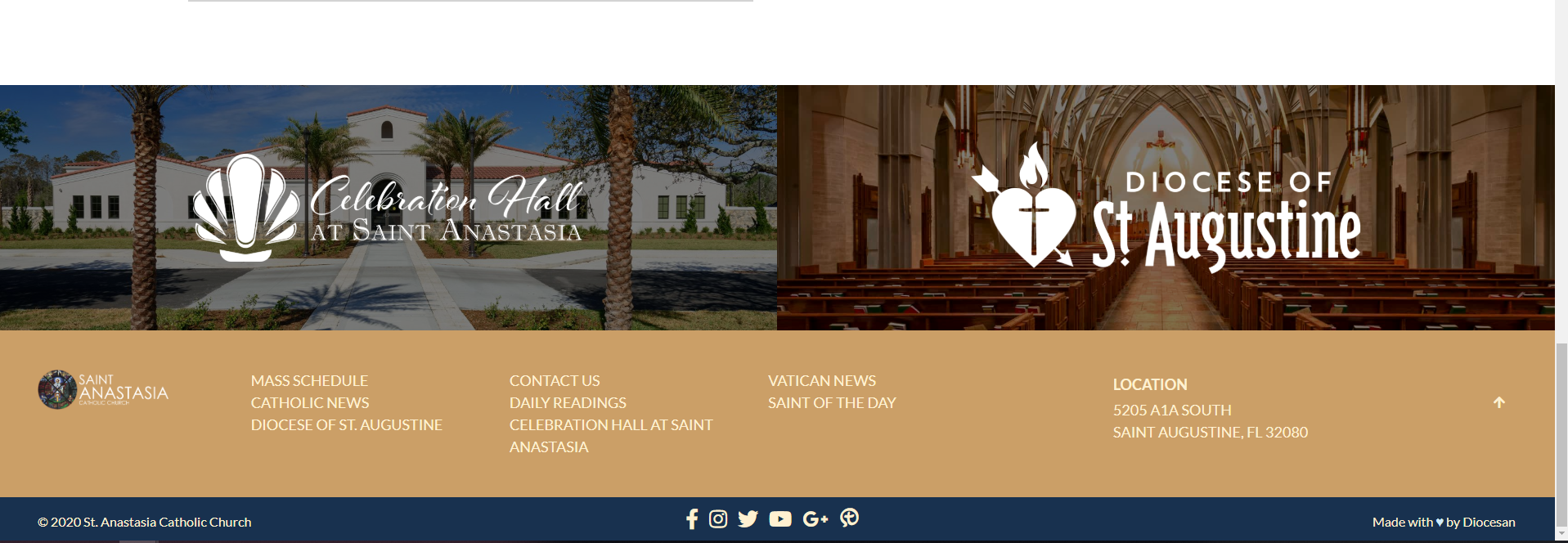
I hope this helps clarify things. Let me know if I missed anything!
Thank you,
Cody Armock
Staff Header Image
I changed the default featured image in the Theme Settings and changed the one for the page.
Gift Shop to the Homepage
That can be added in the backend of the Homepage and going to the featured links tab. You can reorder the links by clicking on the number on the left side and dragging up or down. You can get the icon from https://flaticon.com, just make sure that it matches the other ones pretty well, download the PNG version of it, since the site has problems with SVG.
Social Media
The social media options appear at the very bottom of the page in the footer. I have attached a screenshot to indicate where they are.
I hope this helps clarify things. Let me know if I missed anything!
Thank you,
Cody Armock
Lori Adelfio
Hello!
Talk about turn around! Are you still in the HOME page? It says you're still editing and the changes haven't taken place yet. I'll check back.
Talk about turn around! Are you still in the HOME page? It says you're still editing and the changes haven't taken place yet. I'll check back.
Cody Armock
Good Morning Lori,
Sorry about that! I should no longer be editing the homepage. I see that you made the additional button, so I am glad that it worked.
Have a great weekend,
Cody Armock
Sorry about that! I should no longer be editing the homepage. I see that you made the additional button, so I am glad that it worked.
Have a great weekend,
Cody Armock
Lori Adelfio
Good afternoon Cory,
I have added something to the calendar@saccfl google calendar however it is not showing up on the site. Also, these calendar items will show up under the "Events" side correct? Also, on the slide photos, I have changed the bible verse, but how can I make the font a bit smaller?
Thank you!
I have added something to the calendar@saccfl google calendar however it is not showing up on the site. Also, these calendar items will show up under the "Events" side correct? Also, on the slide photos, I have changed the bible verse, but how can I make the font a bit smaller?
Thank you!
Cody Armock
Good morning Lori,
The calendar can take up to 2 hours on the site to refresh and pull in the new events that were added. If they are not added, please make sure that they are not marked as private or anything like that. It will show up under the Events side of the homepage. I will make a to-do for the verse to be a bit smaller. That is set in the code, so it is not changeable on your end.
Let me know if you have any other questions!
Cody Armock
The calendar can take up to 2 hours on the site to refresh and pull in the new events that were added. If they are not added, please make sure that they are not marked as private or anything like that. It will show up under the Events side of the homepage. I will make a to-do for the verse to be a bit smaller. That is set in the code, so it is not changeable on your end.
Let me know if you have any other questions!
Cody Armock
Cody Armock
Hello Lori,
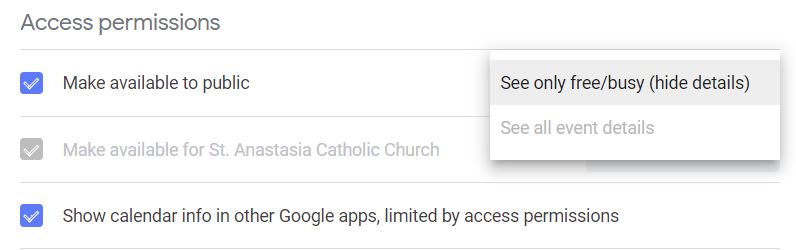
I dug into it a bit more and it looks like the calendar that you are using is only show free/busy events, not all details. With the calendar on the site, if it can't see the event details it will not show any for it. If you can make your calendar fully public (see all event details) then it should start showing on the website. Here is a link on how-to: https://support.google.com/calendar/answer/37083?hl=en/#make_public
Thank you,
Cody Armock
I dug into it a bit more and it looks like the calendar that you are using is only show free/busy events, not all details. With the calendar on the site, if it can't see the event details it will not show any for it. If you can make your calendar fully public (see all event details) then it should start showing on the website. Here is a link on how-to: https://support.google.com/calendar/answer/37083?hl=en/#make_public
Thank you,
Cody Armock
Lori Adelfio
Good morning!
Thank you for looking into it for me. I went into the calendar, because I thought I had done all of this already, but as it stands now, it won't let me change the setting from hide "details" to "all event details". I looked at the link for directions you sent and at the bottom it says "G Suite users: Your domain's administrator may restrict your sharing settings. If you can't find some sharing settings, contact your domain administrator (https://support.google.com/a/answer/60765)."
I attached a screenshot so you can see what I'm looking at.
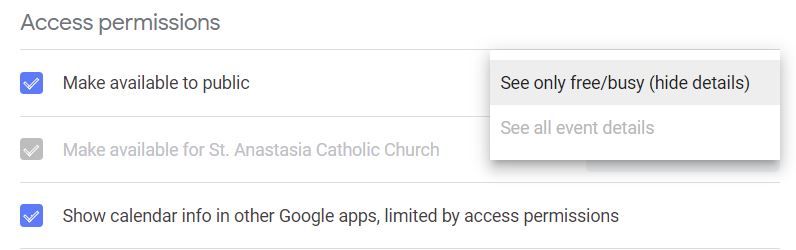
Thank you for looking into it for me. I went into the calendar, because I thought I had done all of this already, but as it stands now, it won't let me change the setting from hide "details" to "all event details". I looked at the link for directions you sent and at the bottom it says "G Suite users: Your domain's administrator may restrict your sharing settings. If you can't find some sharing settings, contact your domain administrator (https://support.google.com/a/answer/60765)."
I attached a screenshot so you can see what I'm looking at.
Cody Armock
Hello Lori,
We have updated the sharing settings, so if you try it again, you should be able to switch it to "See all event details." Thank you for trying to fix that and sorry for not checking those sharing settings first.
Let me know if it still won't let you.
Thank you,
Cody Armock
We have updated the sharing settings, so if you try it again, you should be able to switch it to "See all event details." Thank you for trying to fix that and sorry for not checking those sharing settings first.
Let me know if it still won't let you.
Thank you,
Cody Armock
Lori Adelfio
Thanks Cody, it worked!
If I could ask to add a few things to the "to do list"? The wonky thing with the navigation bar (attached a screenshot) and also, I'd like the "Events" to have the same appearance as the "News" font wise. Also, the "hover color" when hovering over the Event area is Fuschia. If I could, I'd rather change that to the Taupe color that some of the font on the site is, or a grayish or not have any color.
Along with that scripture font size, I'm pretty sure that's all of the aesthetic changes that I'd like to see. The rest of the changes are things I assume I can do from my end. I really appreciate all of your help with this project. I know St. Anastasia isn't your only client that you're helping!
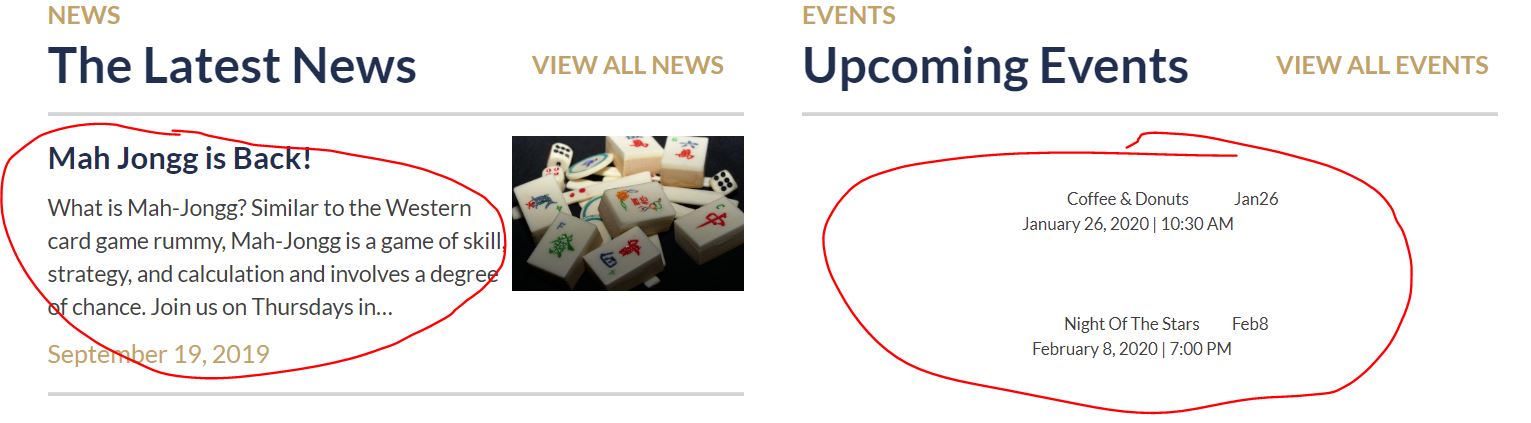
If I could ask to add a few things to the "to do list"? The wonky thing with the navigation bar (attached a screenshot) and also, I'd like the "Events" to have the same appearance as the "News" font wise. Also, the "hover color" when hovering over the Event area is Fuschia. If I could, I'd rather change that to the Taupe color that some of the font on the site is, or a grayish or not have any color.
Along with that scripture font size, I'm pretty sure that's all of the aesthetic changes that I'd like to see. The rest of the changes are things I assume I can do from my end. I really appreciate all of your help with this project. I know St. Anastasia isn't your only client that you're helping!
Cody Armock
Hello Lori,
I am glad it worked!
I have added a to-do for the Bible Verse font-size and have added another for the Calendar to be styled out like the proof has it, so it will match the News section and there won't be a weird hover effect!
I did not see your screenshot for the wonky thing happening with the navigation bar. It looks like you sent the Google Calendar screenshot again, so if you could send that again, so I could identify the issue you are having and make a to-do for it.
Thank you,
Cody Armock
I am glad it worked!
I have added a to-do for the Bible Verse font-size and have added another for the Calendar to be styled out like the proof has it, so it will match the News section and there won't be a weird hover effect!
I did not see your screenshot for the wonky thing happening with the navigation bar. It looks like you sent the Google Calendar screenshot again, so if you could send that again, so I could identify the issue you are having and make a to-do for it.
Thank you,
Cody Armock
Lori Adelfio
Whoops! Ok, attached is the navigation bar. I have now submitted the parish website to the Pastor. Still waiting on permission to launch the Celebration Hall site. The Pastor has both in front of him, so I will keep you informed!

Cody Armock
Thank you for sending that Lori and for keeping us updated on that. Please give us about two weeks' notice for us to make sure that things are ready for the site to launch.
I will make that to-do momentarily.
Thank you,
Cody Armock
I will make that to-do momentarily.
Thank you,
Cody Armock
Lori Adelfio
Cody,
Can I trouble you for the links for the "stock" photos again. I can't seem to find that email and for some reason I didn't save them in my link folder for the web sites.
Thanks again.
Looks like the Celebration Hall site may be a winner. I think the only thing Fr. Tim may change are some photos on the site which is something I can do. I'm thinking I'll have a "ready to launch" email going out to you some time next week =D
Can I trouble you for the links for the "stock" photos again. I can't seem to find that email and for some reason I didn't save them in my link folder for the web sites.
Thanks again.
Looks like the Celebration Hall site may be a winner. I think the only thing Fr. Tim may change are some photos on the site which is something I can do. I'm thinking I'll have a "ready to launch" email going out to you some time next week =D
Cody Armock
https://pixabay.com/
Awesome to hear that it is a winner and I will be looking forward to the email coming hopefully next week.
Thank you and Have a great weekend,
Cody Armock
Awesome to hear that it is a winner and I will be looking forward to the email coming hopefully next week.
Thank you and Have a great weekend,
Cody Armock
Lori Adelfio
Good morning!
I just sat with Fr. Tim and there are a couple of changes he'd like to see.
Under the Registration Form where it asks for occupation or grade. If you "if retired former occupation".
Under Sacraments Link at the top, he would like 6 of the 7 sacraments listed. He feels that if people may look for all the Sacraments under that tab. So perhaps have links (or a link?) to First Communion and Confirmation lead back to the Formation pages for those, Reconciliation leading to the Mass Times page for confessions schedule and Anointing of the Sick lead back to the Contact Us page.
"The Latest News" to "The Latest Parish News"
I have a few changes I also have to make to the site regarding the specific ministry information. But I think after the changes above are made, we can launch BOTH sites! Praise God!
Yours in Christ,
Lori Adelfio
"Peter said to Him, “Lord, if it is You, command me to come to You on the water.” And He said, “Come!” And Peter got out of the boat, and walked on the water and came toward Jesus." Matthew 14:28-29
I just sat with Fr. Tim and there are a couple of changes he'd like to see.
Under the Registration Form where it asks for occupation or grade. If you "if retired former occupation".
Under Sacraments Link at the top, he would like 6 of the 7 sacraments listed. He feels that if people may look for all the Sacraments under that tab. So perhaps have links (or a link?) to First Communion and Confirmation lead back to the Formation pages for those, Reconciliation leading to the Mass Times page for confessions schedule and Anointing of the Sick lead back to the Contact Us page.
"The Latest News" to "The Latest Parish News"
I have a few changes I also have to make to the site regarding the specific ministry information. But I think after the changes above are made, we can launch BOTH sites! Praise God!
Yours in Christ,
Lori Adelfio
"Peter said to Him, “Lord, if it is You, command me to come to You on the water.” And He said, “Come!” And Peter got out of the boat, and walked on the water and came toward Jesus." Matthew 14:28-29
Cody Armock
Hello Lori,
I have made the above changes and just to walk you through what Veronica and I have done to make those changes, just so if they need to be changed again then you know how to.
Registration Form
Veronica went through the Parish Registration Form in the backend and added descriptions to that field.
Sacraments Menu Items
I went to the Menu under the Appearance item in the Wordpress Menu in the backend and just found those pages in the list and dragged them to be under the other items in that area: Baptism, Funerals, and Columbarium and then saved the menu.
Latest News
You can edit the News Title under the Upcoming tab when editing the Homepage.
With those changes made, when would you like to launch the sites? Again, we ask that you give us two weeks' notice before we launch the sites, as to give us time to make sure that everything is working as it needs to when launched. Additionally, we ask that it be a Monday-Thursday, so that if anything does go wrong we have an additional day in the office to fix it.
Let me know what you think!
Thank you,
Cody Armock
Lori Adelfio
Hello Cody!
Thank you so much! I think everything looks great and it's ready to GO! I can do the ministry update work "in between the rain drops" of my day. I MAY have a question or two when it comes to creating these online forms again, but I think I have the rest of it down! (I hope?)
It's been a pleasure working with you both!
Thank you so much! I think everything looks great and it's ready to GO! I can do the ministry update work "in between the rain drops" of my day. I MAY have a question or two when it comes to creating these online forms again, but I think I have the rest of it down! (I hope?)
It's been a pleasure working with you both!
Cody Armock
Good Morning Lori,
I will put on our calendars that we will launch on March 16th (two weeks from now) to give ourselves time to test the site and make sure that it is good to go and functioning as it is supposed to. We will confirm this launch date about a week out from then to make sure that everything is still ready on your end!
Let us know if you have any questions!
It was a pleasure working with you too!
Cody Armock
I will put on our calendars that we will launch on March 16th (two weeks from now) to give ourselves time to test the site and make sure that it is good to go and functioning as it is supposed to. We will confirm this launch date about a week out from then to make sure that everything is still ready on your end!
Let us know if you have any questions!
It was a pleasure working with you too!
Cody Armock
Lori Adelfio
Perfect!
Cody Armock
Hello Lori,
I want to just confirm that you are still ready to launch the site next Monday, March 16th. We will be ready on our end to launch the site. Just a reminder, please refrain from editing the site between the hours of 9am EST and 1pm EST because it can cause issues and more frequently, cause your changes to be erased.
Let me know if next Monday, March 16th, still works for you!
Thank you,
Cody Armock
I want to just confirm that you are still ready to launch the site next Monday, March 16th. We will be ready on our end to launch the site. Just a reminder, please refrain from editing the site between the hours of 9am EST and 1pm EST because it can cause issues and more frequently, cause your changes to be erased.
Let me know if next Monday, March 16th, still works for you!
Thank you,
Cody Armock
Web Department, Diocesan
877-923-0777
Lori Adelfio
Hello!
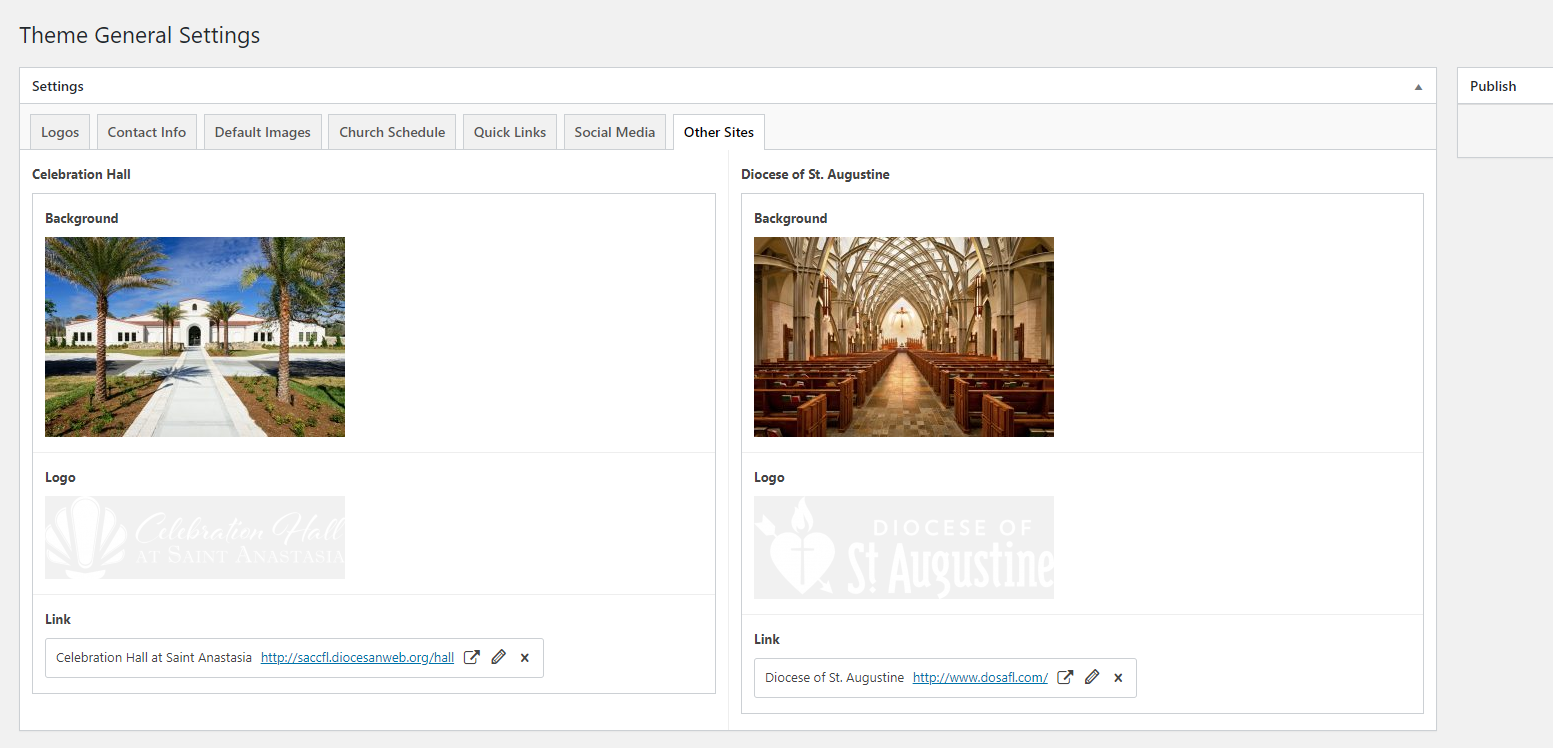
The 16th works for us! On both counts! I will not work on the site or make any changes on that day. I do have one question. At the bottom of the page where you show a box for the Diocese of St. Augustine. How do I go about changing the picture that's behind it to the inside of the Basilica of St Augustine?
Thank you.
The 16th works for us! On both counts! I will not work on the site or make any changes on that day. I do have one question. At the bottom of the page where you show a box for the Diocese of St. Augustine. How do I go about changing the picture that's behind it to the inside of the Basilica of St Augustine?
Thank you.
Cody Armock
Hello Lori,
Thank you for confirming! To edit the image for the box on the bottom of the page, you can go to the Theme Settings in the backend and then go to the "Other Sites" tab and click the 'x' to remove the current image in there and put in the image that you want, like the screenshot below.
I hope that helps!
Cody Armock
Thank you for confirming! To edit the image for the box on the bottom of the page, you can go to the Theme Settings in the backend and then go to the "Other Sites" tab and click the 'x' to remove the current image in there and put in the image that you want, like the screenshot below.
I hope that helps!
Cody Armock
Web Department, Diocesan
877-923-0777
 Lori Adelfio
Good afternoon!
I was wondering how to remove the link and date under the "Latest Parish News". It still reads September 19. 2019 I've looked around and I can't seem to find it?
I was wondering how to remove the link and date under the "Latest Parish News". It still reads September 19. 2019 I've looked around and I can't seem to find it?
Cody Armock
Hello Lori,
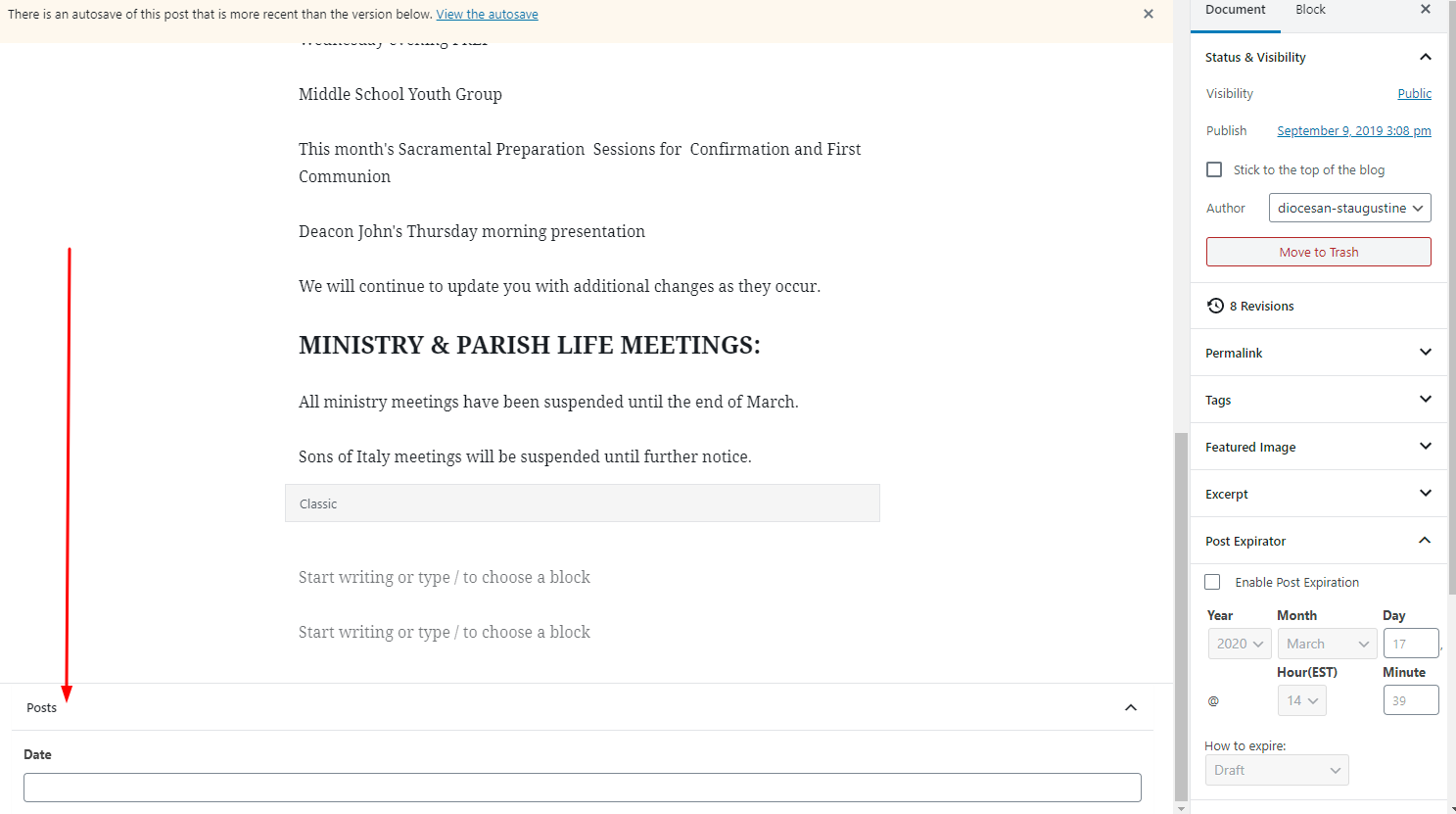
At the bottom of the post, when editing it in the backend, there is a date selector at the bottom of the page, you may have to scroll to see it. I just removed the date for September 19, 2019. It says "TBA" instead, but if you'd like we can just have it display nothing if there is no date selected for the post. Would you like us to do that?
The image shows you where the date field is on the post in the backend.
Let me know what you would like us to do, keep it as "TBA" or remove it if there is no date.
Cody Armock
At the bottom of the post, when editing it in the backend, there is a date selector at the bottom of the page, you may have to scroll to see it. I just removed the date for September 19, 2019. It says "TBA" instead, but if you'd like we can just have it display nothing if there is no date selected for the post. Would you like us to do that?
The image shows you where the date field is on the post in the backend.
Let me know what you would like us to do, keep it as "TBA" or remove it if there is no date.
Cody Armock
Web Department, Diocesan
877-923-0777
 Lori Adelfio
Hello!
Ok, I see it now. Didn't even look there! Could have bit me! So I have changed it to today's. But does that field have to be there at all?
Ok, I see it now. Didn't even look there! Could have bit me! So I have changed it to today's. But does that field have to be there at all?
Cody Armock
Hello Lori,
If you don't want the field to be used or shown, we can remove it. Would you like us to do that?
Thank you,
Cody Armock
If you don't want the field to be used or shown, we can remove it. Would you like us to do that?
Thank you,
Cody Armock
Lori Adelfio
It's fine to remove it, I don't think it's necessary do you?
Cody Armock
I don't think so either, since Events events are more concerned with dates whereas News is not. I will make the to-do for the developer to remove that field and remove it from displaying.
Cody
Cody
Lori Adelfio
Hi Cody,
Is there a way you can add the social buttons to the top of the site? Not giant like the bottom, but smaller buttons just above the "I'm New" navigation?
Is there a way you can add the social buttons to the top of the site? Not giant like the bottom, but smaller buttons just above the "I'm New" navigation?
Cody Armock
Veronica, This would probably need to be billed out, so I will let you handle it. I would imagine that it is billed out.
Veronica Alvarado
Parish site, correct?
Cody Armock
I would imagine so.
Veronica Alvarado
Hi Lori,
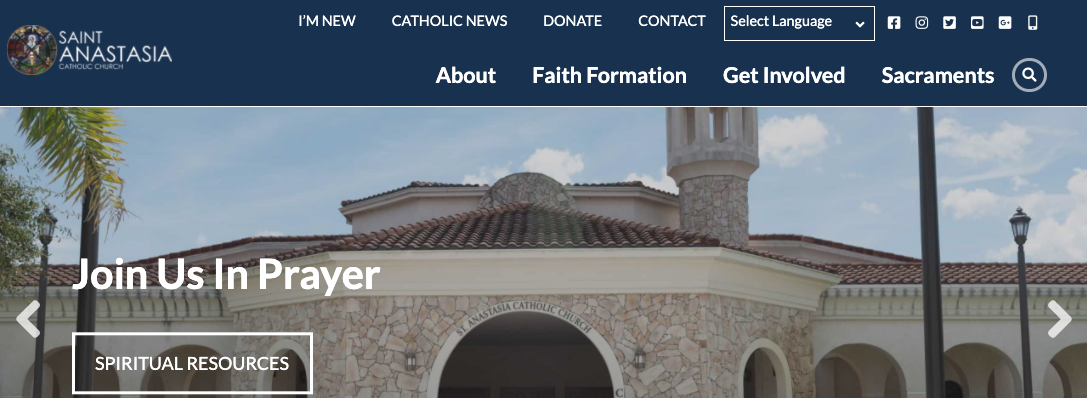
Looking at your site, we can add your social media as icons (same as the footer) into your top menu (before I'm New or before the Select Language bar). Since you are still within 2 weeks of your launch, we can add these at no additional cost.
If you would like the icons to go above the I'm New menu, I can talk to a developer to put together a quote and send it over to you for approval.
Please let us know which option/location you prefer.
Thank you,
Veronica Alvarado
Project Manager, Web Department
877-923-0777
Lori Adelfio
Whichever looks aesthetically right.
Thank you!!
Lori
Thank you!!
Lori
Veronica Alvarado
Good morning Lori,
I just wanted to let you know that we've added the icons and already have a developer working on updating the styling so the menu looks right.
I'll give you an update once he's smoothed out all the rough edges!
Thank you,
Veronica Alvarado
Project Manager, Web Department
877-923-0777
Lori Adelfio
Great! I think just above would be great. Perfect size!
Thank you for this! It will be a help to our parishioners who aren't necessarily "tech savvy" and need it right in front of them!
Thank you for this! It will be a help to our parishioners who aren't necessarily "tech savvy" and need it right in front of them!
Veronica Alvarado
Hi Lori,
The developer was able to quickly update the sizing between the icons so as to not incur any costs to you.
You may need to hard refresh to see the updated changes, but I have included a screenshot below of what you should be seeing.
Let me know if you have any questions,
Veronica Alvarado
Project Manager, Web Department
877-923-0777
 Lori Adelfio
It's perfect! I can't thank you enough. Everyone loves the new look of the site and the ease of navigation.
It has been a pleasure working with you!
It has been a pleasure working with you!
Veronica Alvarado
I'm glad you like it!
Thanks for being so easy to work with, Lori. We're always glad to help.
Thanks for being so easy to work with, Lori. We're always glad to help.
Veronica Alvarado
Project Manager, Web Department
877-923-0777
Lori Adelfio
Hello,
I was hoping you could help me with something? Unfortunately, our YOUTUBE account can not be used with a mobile device to go "live". Apparently with their new guidelines you need 1000 people following it. We would like to be able to stream our Mass on the website for those who do not have a Facebook account. Is there a Facebook plug in that can be put up on the website for people to be able to view the Mass on the website?
I was hoping you could help me with something? Unfortunately, our YOUTUBE account can not be used with a mobile device to go "live". Apparently with their new guidelines you need 1000 people following it. We would like to be able to stream our Mass on the website for those who do not have a Facebook account. Is there a Facebook plug in that can be put up on the website for people to be able to view the Mass on the website?
Lori Adelfio
Hello,
I was hoping you could help me with something? Unfortunately, our YOUTUBE account can not be used with a mobile device to go "live". Apparently with their new guidelines you need 1000 people following it. We would like to be able to stream our Mass on the website for those who do not have a Facebook account. Is there a Facebook plug in that can be put up on the website for people to be able to view the Mass on the website?
I was hoping you could help me with something? Unfortunately, our YOUTUBE account can not be used with a mobile device to go "live". Apparently with their new guidelines you need 1000 people following it. We would like to be able to stream our Mass on the website for those who do not have a Facebook account. Is there a Facebook plug in that can be put up on the website for people to be able to view the Mass on the website?
Cody Armock
Good Morning Lori,
I am so sorry that I didn't respond earlier. It must have slipped through the cracks until now. My apologies.
- You can right-click on the Facebook video
- Click Show Video URL
- Copy it
- Paste it onto a page on the website.
- It won't be able to be posted onto the Homepage, but you can have a link somewhere on the homepage that goes to the Facebook or Livestreaming page and then paste the URL Link in the backend editor and it should embed it as a Facebook embed.
- You may not be able to see the Preview of it from the backend, but once you publish it, the video should show on the frontend. This video will be available to everyone who views the page, regardless of having a Facebook account or not.
In the future, please send all questions you may have to the webdepartment@diocesan.com email. This is the email that we monitor closely throughout the day because this Basecamp project will soon be archived and the emails sent through may not notify us.
Thank you,
Cody Armock
Web Department, Diocesan
877-923-0777
Lori Adelfio
Good afternoon Cody,
Thank you. It's ok! I understand. I figured out a way to embed the live feed onto the page. So, for now, it's working for us.
Hope all is well!
Thank you. It's ok! I understand. I figured out a way to embed the live feed onto the page. So, for now, it's working for us.
Hope all is well!
Cody Armock
Wonderful!
I am glad that it is working and hope all is well for you too.
Cody
I am glad that it is working and hope all is well for you too.
Cody