











Last Two Updates
Good morning Amy,
So I finally had the chance to sit down with one of our designers and Micheal to discuss the last two items on our list.
- Preschool Related Pages
As small as this may seem, to show the Preschool's related pages in the usual brown sidebar would actually take about another 5 hours of work (roughly $350). Honestly, since it is only one page that needs its children/sub pages to show, I am not sure that it is worth it.
I think the best thing to do for this page is to leave that menu that you created, but to move it to the left side, so it is similar to the other sidebar pages. If anything, I think this will give the Preschool page its own vibe and ensure that parents understand that there is a lot that goes into the preschool, not a basic/tiny program.
I have made this column move for you to see what you think. - White Space Around Title
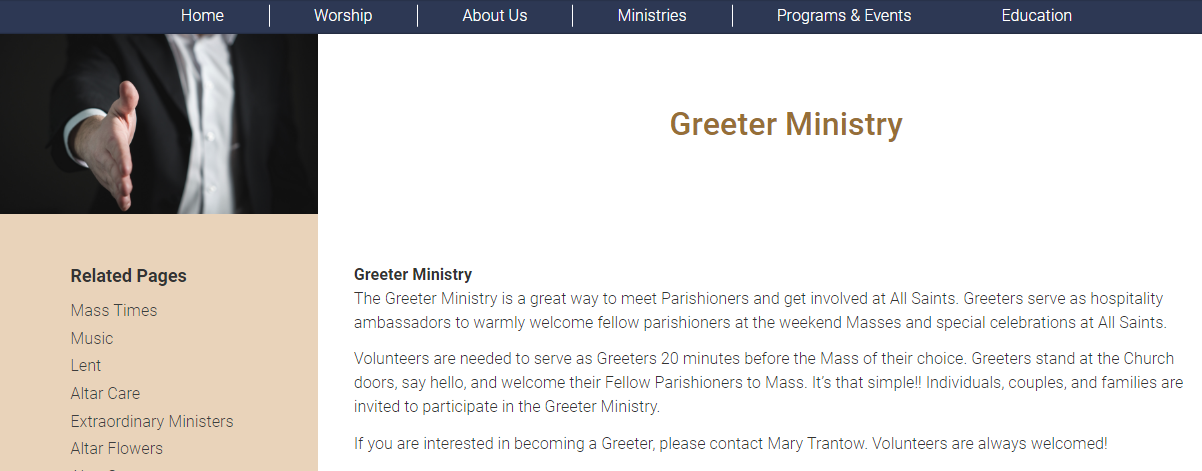
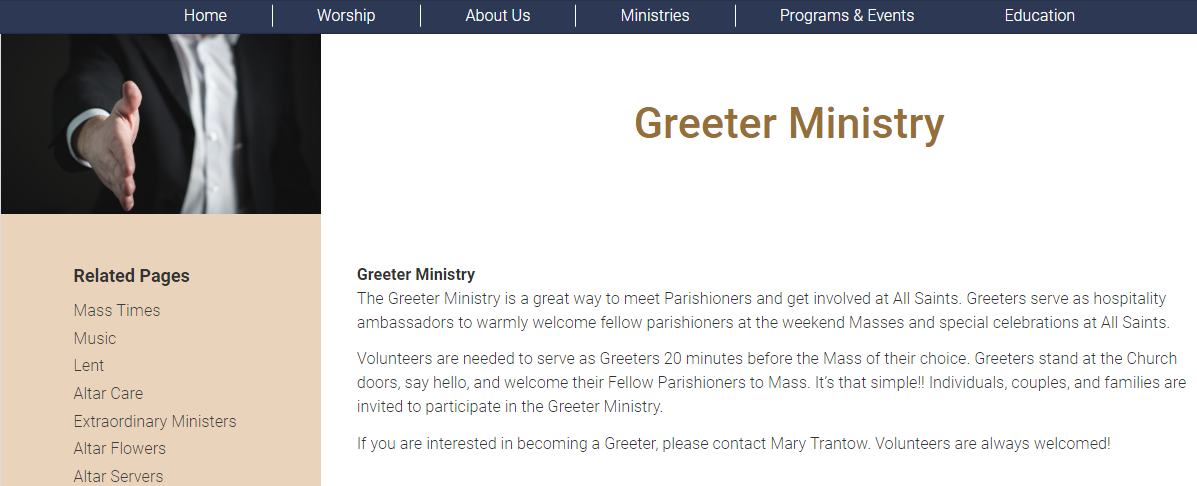
Again, this is a small change that would take us even further over the budgeted price for the website. Additionally, our designer said that the that I think may be unnecessary. I think we could solve this issue by having the page font be a little larger and having longer titles.
I think making the font bigger makes it look as though the white space is there to emphasize the title, not leave it looking lonely and "floating."
Let me know what you think of these solutions.
Again, we can make the full-blown changes, but it would cost another $700-1,100 to do since they would require the rebuilding of the entire page layout.
Thank you so much for your patience with Diocesan throughout this entire process and hopefully these changes will help you achieve your website goals!
Veronica Alvarado
Web Department, Diocesan
877-923-0777
877-923-0777
 Beth McTighe
Hi Veronica,
Thank you for responding to my concerns. We are almost ready to redirect the other site.
Regarding previous items:
* I still have a concern about the calendar on the main page. Today, Palm Sunday’s events are listed under the prior day. Since Saturday has no events, I put one in to see if that would kick Sunday’s events back to Sunday without success. Can you tell me why events are appearing under the wrong day? Google calendar link: https://calendar.google.com/calendar/r
* Preschool pages. I’d like to leave the column on the right so they don’t show up at the top of mobile screens. Page content should appear first. The preschool demographic is one that relies heavily on mobile, and we don’t want people to miss the information on the main page thinking they need to click on those nav links first. That is why I wanted a new left column. If you look at other pages, like parish school of religion, you don’t see the left column navigation buttons unless you tap on the gray menu box.
* Changing the title font size sounds like it could be a good fix. The examples you sent were blank so I can’t see them. The white space issue was brought up to the designer when we got rid of the title color block prior to development.
* Another former issue: Sam and Gary said they would look into the plug in for the arrows and dots on the metaslider to find a better alternative. The current system has the mouse over feature in the bar below the metaslider interfere with the dots that help select slides. I found a setting on the admin side to hid those dots and that is the current setting.
This is a great site and I expect it will meet our needs. I hope to manage most everything in-house; however, I’m sure there will be times I need Diocesan’s help. Going forward, can you tell me what kind of services are covered under hosting fees and what kind of pay structure there is for changes not covered? This will help me with knowing what kind of requests from my side to discourage due to added charges.
Best,
Beth McTighe
Thank you for responding to my concerns. We are almost ready to redirect the other site.
Regarding previous items:
* I still have a concern about the calendar on the main page. Today, Palm Sunday’s events are listed under the prior day. Since Saturday has no events, I put one in to see if that would kick Sunday’s events back to Sunday without success. Can you tell me why events are appearing under the wrong day? Google calendar link: https://calendar.google.com/calendar/r
* Preschool pages. I’d like to leave the column on the right so they don’t show up at the top of mobile screens. Page content should appear first. The preschool demographic is one that relies heavily on mobile, and we don’t want people to miss the information on the main page thinking they need to click on those nav links first. That is why I wanted a new left column. If you look at other pages, like parish school of religion, you don’t see the left column navigation buttons unless you tap on the gray menu box.
* Changing the title font size sounds like it could be a good fix. The examples you sent were blank so I can’t see them. The white space issue was brought up to the designer when we got rid of the title color block prior to development.
* Another former issue: Sam and Gary said they would look into the plug in for the arrows and dots on the metaslider to find a better alternative. The current system has the mouse over feature in the bar below the metaslider interfere with the dots that help select slides. I found a setting on the admin side to hid those dots and that is the current setting.
This is a great site and I expect it will meet our needs. I hope to manage most everything in-house; however, I’m sure there will be times I need Diocesan’s help. Going forward, can you tell me what kind of services are covered under hosting fees and what kind of pay structure there is for changes not covered? This will help me with knowing what kind of requests from my side to discourage due to added charges.
Best,
Beth McTighe
 Veronica Alvarado
Beth,
To address your concerns:
- Calendar
It seems that the calendar link you sent will only go to your calendar if I were logged into your account.
On the website, Palm Sunday's events are listed on Sunday, so I am not sure what you are referring to. Am I correct in assuming you mean when you view the calendar through your Google account? If so, that may be a personal setting in the individual event or calendar display and not something we are qualified to help with. You may want to check out Google's Calendar Help Center (click here).- Here is what I see on the website's homepage
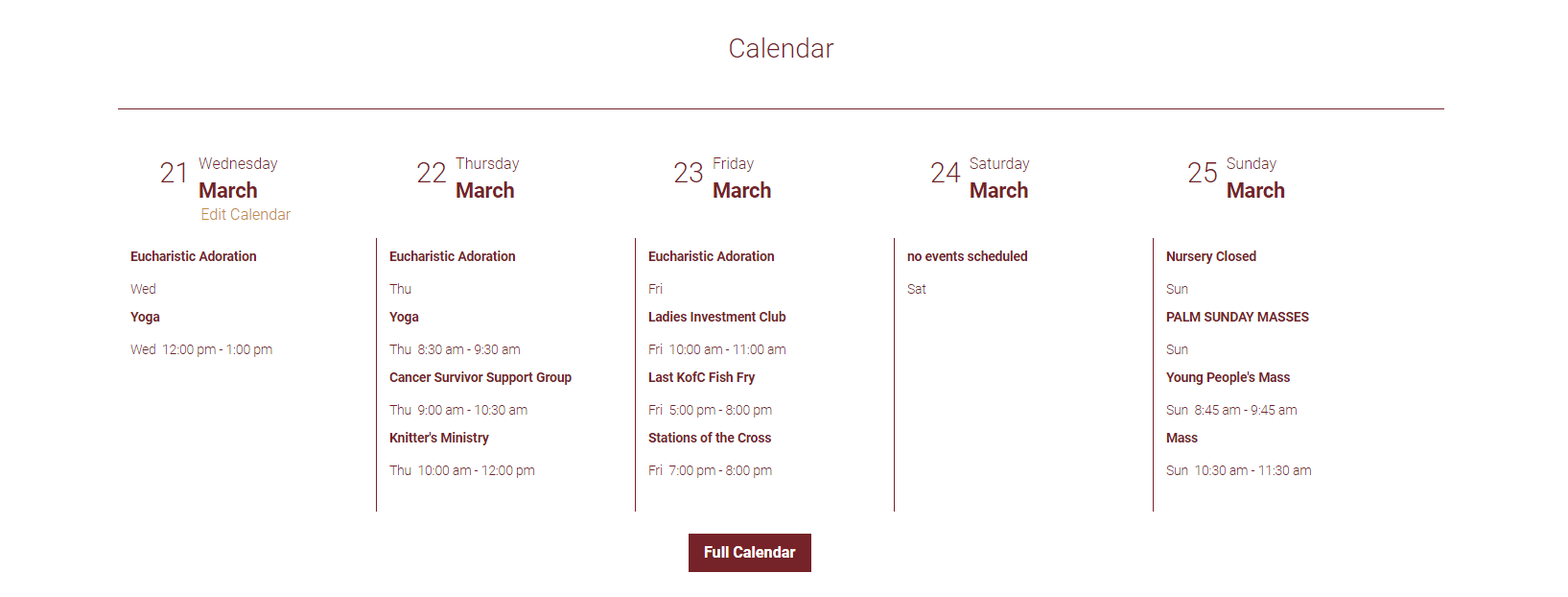
- Here is what I see on the calendar page:
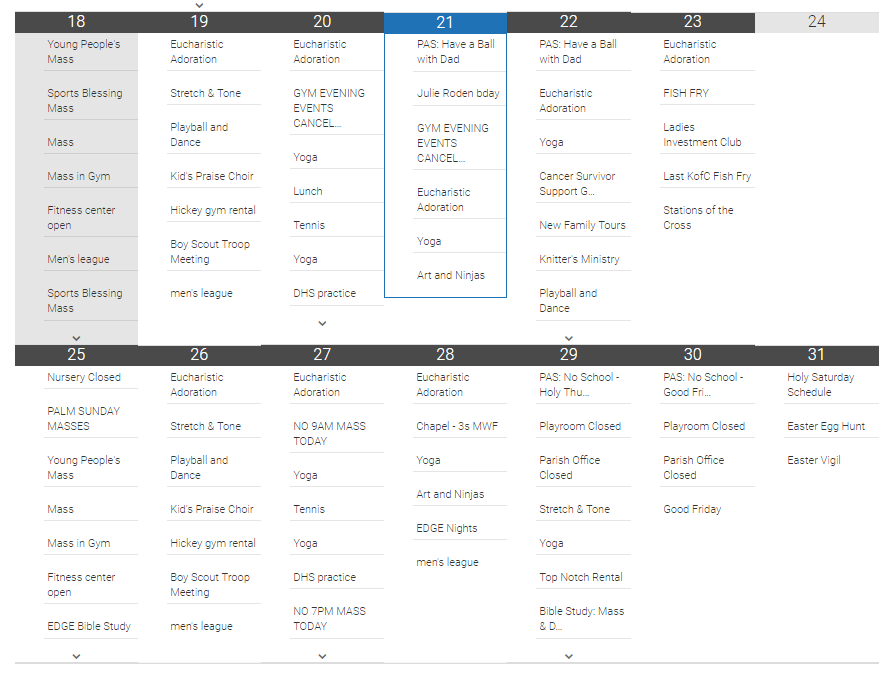
Both calendar views seem to display Palm Sunday on Sunday, as it should be.
- Here is what I see on the website's homepage
- Preschool Page
I have moved the column back to the right side.
Another idea I had was to have the Preschool page be an "About the Preschool" page under Preschool so that the related pages will show its sibling pages (philosophy&curriculum, environment, classes, etc.) This is what you were trying to accomplish, we just may need to fib it a little to have the needed pages to appear.
If you want me to show you how to do this, please give me a call at 877-923-0777. - Page Titles
Oh, I am not sure why they did not send, but here are the images I was referring to:- Here is the current font size
- Here is the larger font size
- Here is the current font size
- Metaslider
I am not sure about this slider or what you discussed with Gary and Sam, but if you are simply looking for navigation, there are still navigation arrows on either side of your slider now. They only appear when your mouse hovers over the image. They are currently set to be a dark color (barely noticeable) but if you would like them to be a lighter color, we can most definitely do that.
OR are do you want the dots, to show?- I found a lighter slide of yours where you can see the navigation arrows:
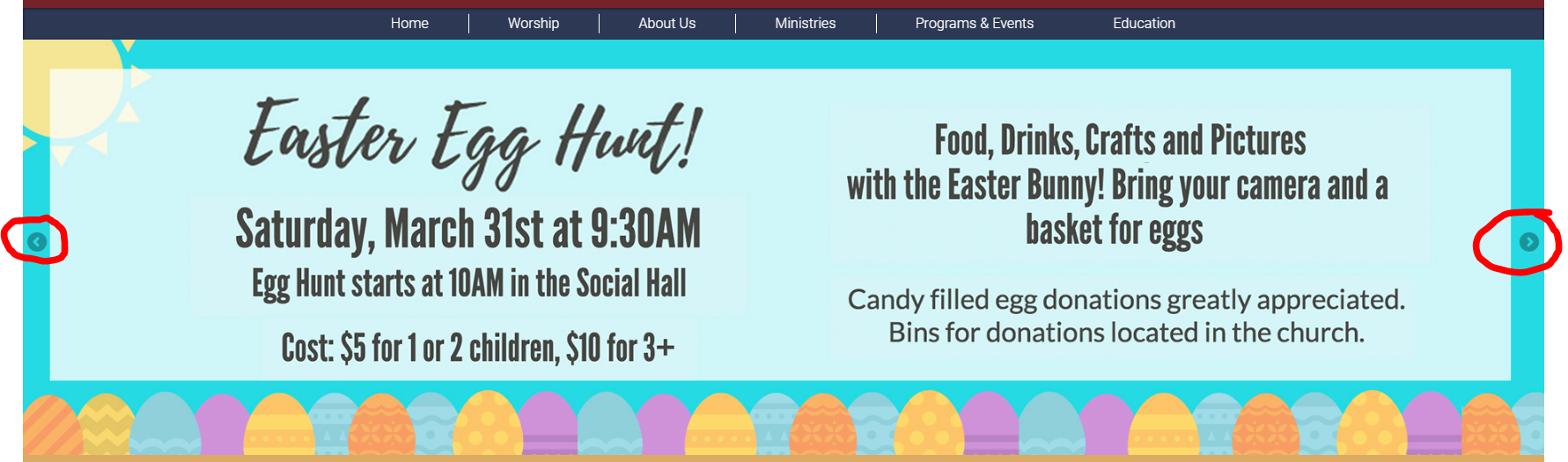
- I found a lighter slide of yours where you can see the navigation arrows:
- Support
There are two types of support that Diocesan offers: free support and $70/hr technical support (you get $50/hr).- Diocesan offers free support for items such as:
- Forgotten passwords
- How to edit page content
- How to use plugins
- Where things are edited and how to get to them
- Updating contact information in footer (office hours, address, phone number, email, etc)
- "Broken" items that seem random and/or seem to be out of your control
- "Broken" or trashed pages that you need help restoring
- Other broken items that you cannot solve
- Diocesan normally charges a fee of $70/hr for technical support, but since your website is hosted with us, we offer you $50/hr.
Technical support refers to changes or additions to your website's functionality. This includes, but is not limited to:- Adding/switching plugins
- Changing design colors, sizes, and fonts
- Adding/removing buttons
- Adding/removing sections or elements of the homepage
- Adding to/changing layout of header, footer and pages
- Diocesan offers free support for items such as:
If you have any other questions, please let me know.
Beth McTighe
Hi Veronica,
I am referring to the calendar view on the main web page. When I went back the calendar was fixed with events on correct days. I tested it by deleting the Saturday event (which said “No Events Today”). Now the calendar is back to this…
[cid:image003.jpg@01D3C12C.6CD07940]
If there are no events on a day, will this always happen?
PRESCHOOL
Your fix is great. I created the About the Preschool page and it works well. It would be even better if the main Preschool page (with the arrow next to it) was not clickable in the dropdown nav menu. I don’t think I can do that. Can you make that happen, or show me where that option is? Will doing that have an effect I’m not aware of right now?
LARGER TITLE
That’s good for now. I think eventually, if I can get the cost approved, I’d like to decrease the amount of white space. But increasing the font is a great idea in the interim. Previously you mentioned adding a line. Did you try that? And if so, did it not look right?
METASLIDER ARROWS
Yes, I knew those arrows were there, but they aren’t always visible. Maybe making them lighter would help.
Thanks for all your help and the list of services we have access to. So good to know.
Best,
Beth McTighe
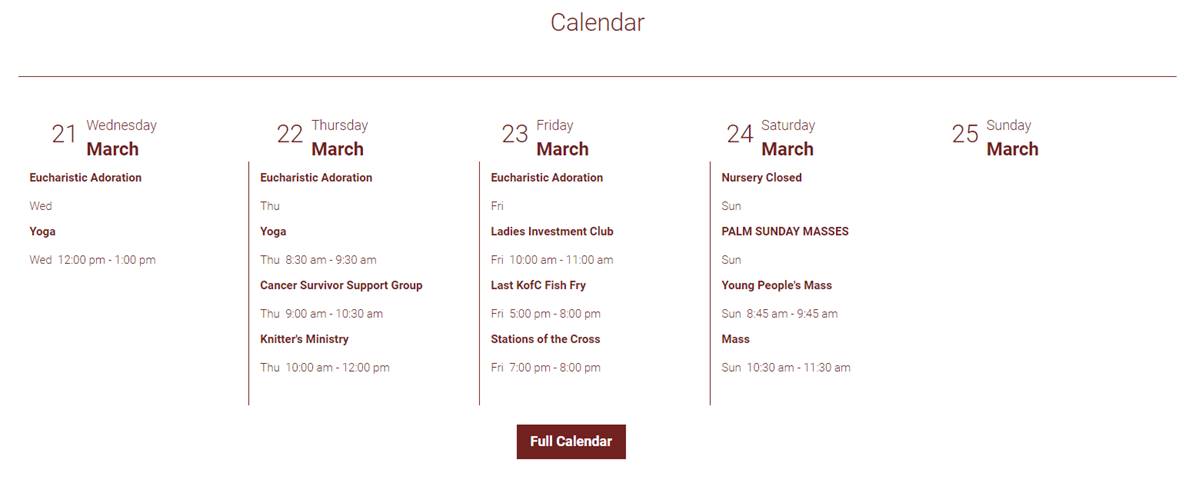
I am referring to the calendar view on the main web page. When I went back the calendar was fixed with events on correct days. I tested it by deleting the Saturday event (which said “No Events Today”). Now the calendar is back to this…
[cid:image003.jpg@01D3C12C.6CD07940]
If there are no events on a day, will this always happen?
PRESCHOOL
Your fix is great. I created the About the Preschool page and it works well. It would be even better if the main Preschool page (with the arrow next to it) was not clickable in the dropdown nav menu. I don’t think I can do that. Can you make that happen, or show me where that option is? Will doing that have an effect I’m not aware of right now?
LARGER TITLE
That’s good for now. I think eventually, if I can get the cost approved, I’d like to decrease the amount of white space. But increasing the font is a great idea in the interim. Previously you mentioned adding a line. Did you try that? And if so, did it not look right?
METASLIDER ARROWS
Yes, I knew those arrows were there, but they aren’t always visible. Maybe making them lighter would help.
Thanks for all your help and the list of services we have access to. So good to know.
Best,
Beth McTighe
Veronica Alvarado
Good Morning Beth,
I was going to message you yesterday, but I wanted to get in touch with Google support in regards to the calendar.
From what they were saying, and in conjunction with our developer Micheal, there isn't a way for Google to fully recognize there are no events on a certain day when it is a feed like that. Meaning in a normal calendar set up, Google "pushes" the events to certain days, but there is nothing that sends a message that tells the website that "this day has nothing, so create a no-events-today event."
What this means for you is that if there are no events on a day, you should put an all day event that says "No Events" or something similar. Since All Saints seems to have something nearly everyday, this will be tedious, but not occur very often. For example, next month, there are events on each day. Looking at your calendar at the beginning of the month should be enough to decide what days you should create a "No Events" event.
Sorry there isn't more we could do about this. I really thought Google would have a solution!
Preschool/Menu
You can most definitely make that change in the menu! I have already done added the blank link (unclickable link) and provided the steps below:
I was going to message you yesterday, but I wanted to get in touch with Google support in regards to the calendar.
From what they were saying, and in conjunction with our developer Micheal, there isn't a way for Google to fully recognize there are no events on a certain day when it is a feed like that. Meaning in a normal calendar set up, Google "pushes" the events to certain days, but there is nothing that sends a message that tells the website that "this day has nothing, so create a no-events-today event."
What this means for you is that if there are no events on a day, you should put an all day event that says "No Events" or something similar. Since All Saints seems to have something nearly everyday, this will be tedious, but not occur very often. For example, next month, there are events on each day. Looking at your calendar at the beginning of the month should be enough to decide what days you should create a "No Events" event.
Sorry there isn't more we could do about this. I really thought Google would have a solution!
Preschool/Menu
You can most definitely make that change in the menu! I have already done added the blank link (unclickable link) and provided the steps below:
- Log in and go to Appearance>Menus
- Locate Custom Links
On the left side, you will see Custom Links. This is used for linking off site, or straight to a document, but can also be used for blank/unclickable menu items. Some examples of this are Worship, Programs & Events, Basketball, and Education.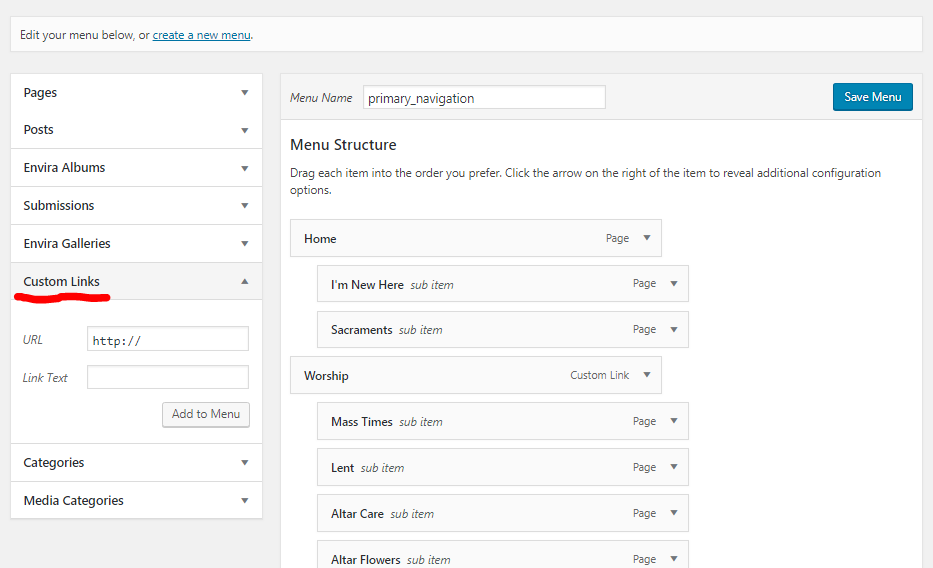
- Add a fake custom link
Since we will be deleting the contents of the url, you can just type whatever into the url area. Link Text is what the menu item will be. In this case, "Preschool" is what we want. Click "Add to Menu."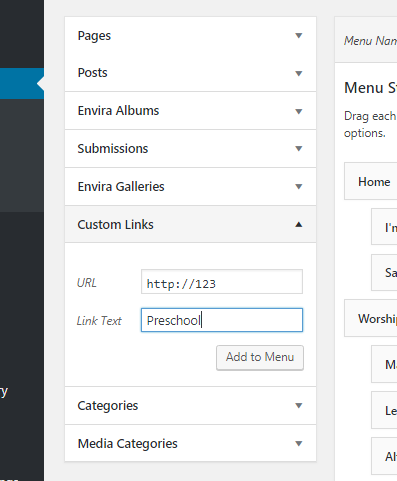
- Move the Menu Item as Needed
When you add an item to the menu, it will automatically be placed at the bottom. You can move this by clicking and dragging the box to where you need it to be. There will be a dotted outline of where the box will be placed, so be sure it is exactly where you need it to be.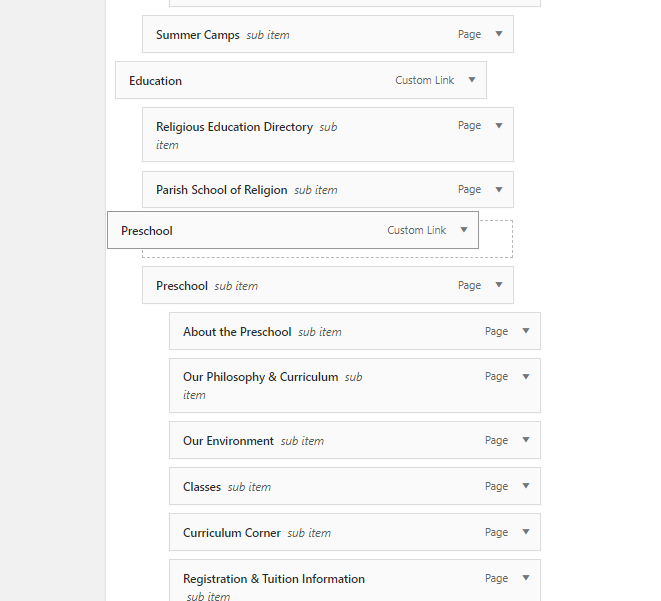
- Edit the Custom Link
Since we put in a fake link, we must now delete the contents of the URL area, so that when people click on "Preschool" in the menu, it will open up instead of going to an actual page/link. You can edit the menu item by clicking on the small down arrow on the right side of its box. Delete the URL.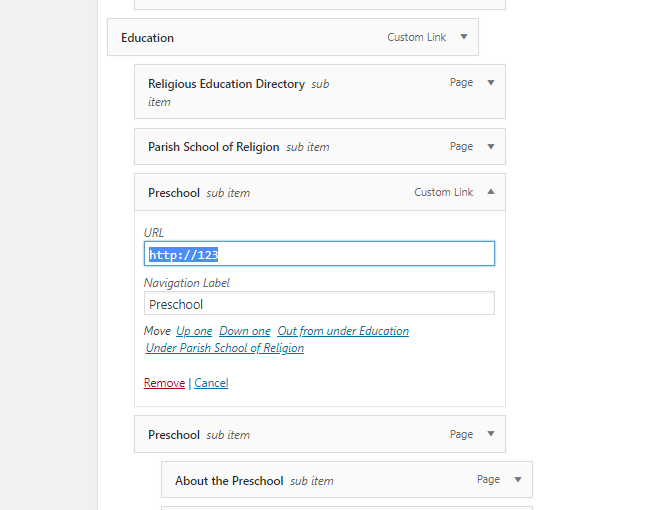
- Move Sub Items
Now we need to move the sub items under the new Preschool custom link. Similarly, we can click and drag them to their new spot. Be sure that they are indented under the new Preschool as subpages.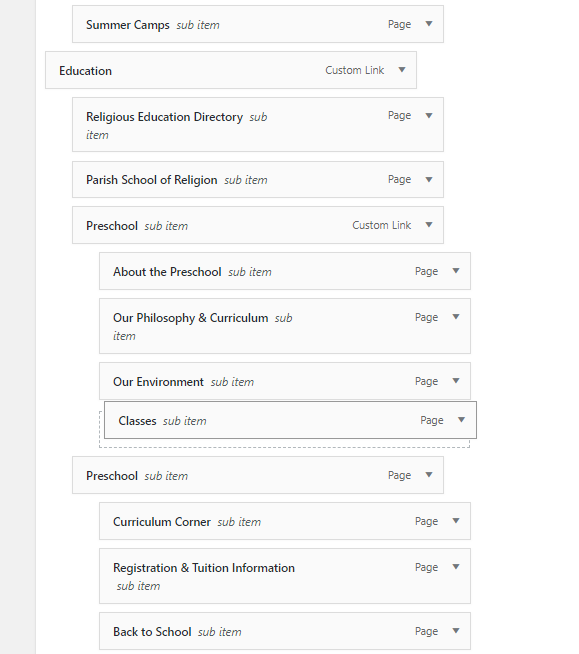
- Delete Other Page
We don't want the Preschool page on there with the new Preschool, so we will remove the original Preschool menu item. Again, click the down arrow on the box and click "Remove."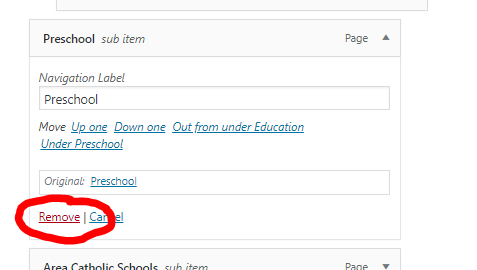
- Save Menu
The last step is to save the menu. The "Save Menu" buttons are both at the very bottom and very top of the Menus page.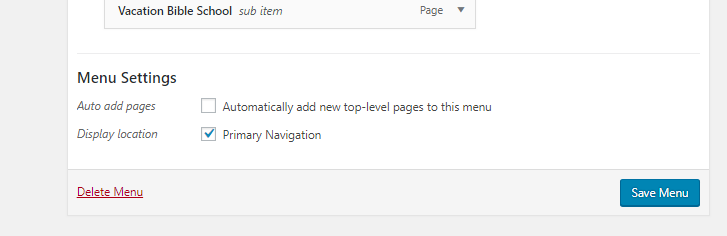
Veronica Alvarado
Page Title
As for the white space around the titles, we could begin once you had the approval for the cost, but I think the simple font size fix really makes a big difference. I did inquire about the line, but when we tried it, it simply made the top of the page look busy and extremely boxy. Honestly, it made the title area look like it was missing a colored background.
MetaSlider
For the metaslider arrows, Michael can look into the images, but I have found the settings for the slider to have the dots and the arrows display below the slider. I have changed it to this for now. Please take a look and let me know what you think.
As for the white space around the titles, we could begin once you had the approval for the cost, but I think the simple font size fix really makes a big difference. I did inquire about the line, but when we tried it, it simply made the top of the page look busy and extremely boxy. Honestly, it made the title area look like it was missing a colored background.
MetaSlider
For the metaslider arrows, Michael can look into the images, but I have found the settings for the slider to have the dots and the arrows display below the slider. I have changed it to this for now. Please take a look and let me know what you think.
Veronica Alvarado
Web Department, Diocesan
877-923-0777
877-923-0777
Beth McTighe
Page Title
Okay. Let’s just do the bigger title font for now. Thanks for trying the line and using your best judgement to nix what doesn’t work.
MetaSlider
That option helps make additional slide more evident, but I’m not crazy about the white box it creates around the slides. Maybe just larger arrows on the sides of the slide screen?
Beth McTighe
Okay. Let’s just do the bigger title font for now. Thanks for trying the line and using your best judgement to nix what doesn’t work.
MetaSlider
That option helps make additional slide more evident, but I’m not crazy about the white box it creates around the slides. Maybe just larger arrows on the sides of the slide screen?
Beth McTighe
Veronica Alvarado
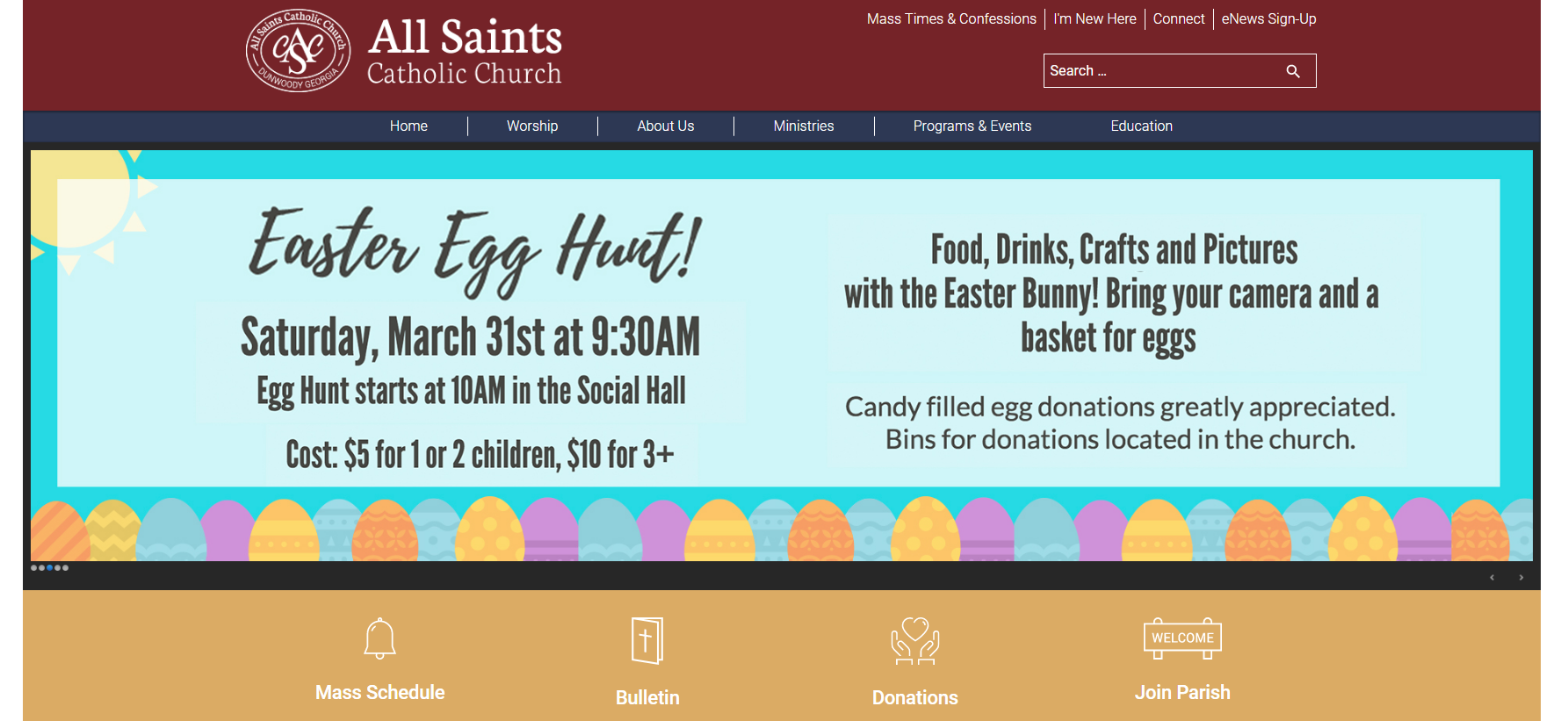
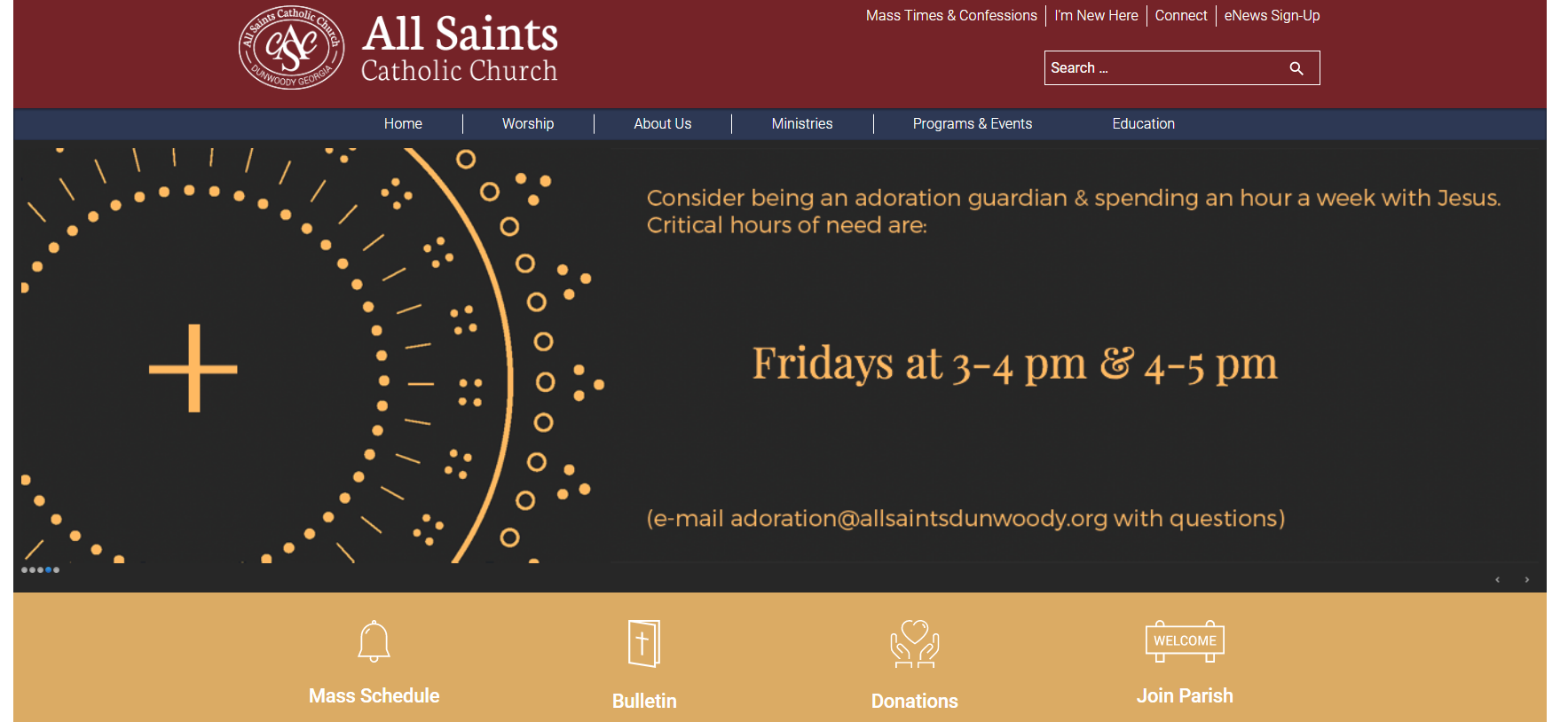
Okay so I have looked at other options other than just the arrows and I think you may be able to find one you like from here:
- Black Border
- Bottom Bar
Bar disappears unless you hover, which keeps the slider looking clean unless you are wanting to see a specific slide.
Additionally, the bar is not covered by the boxes beneath it.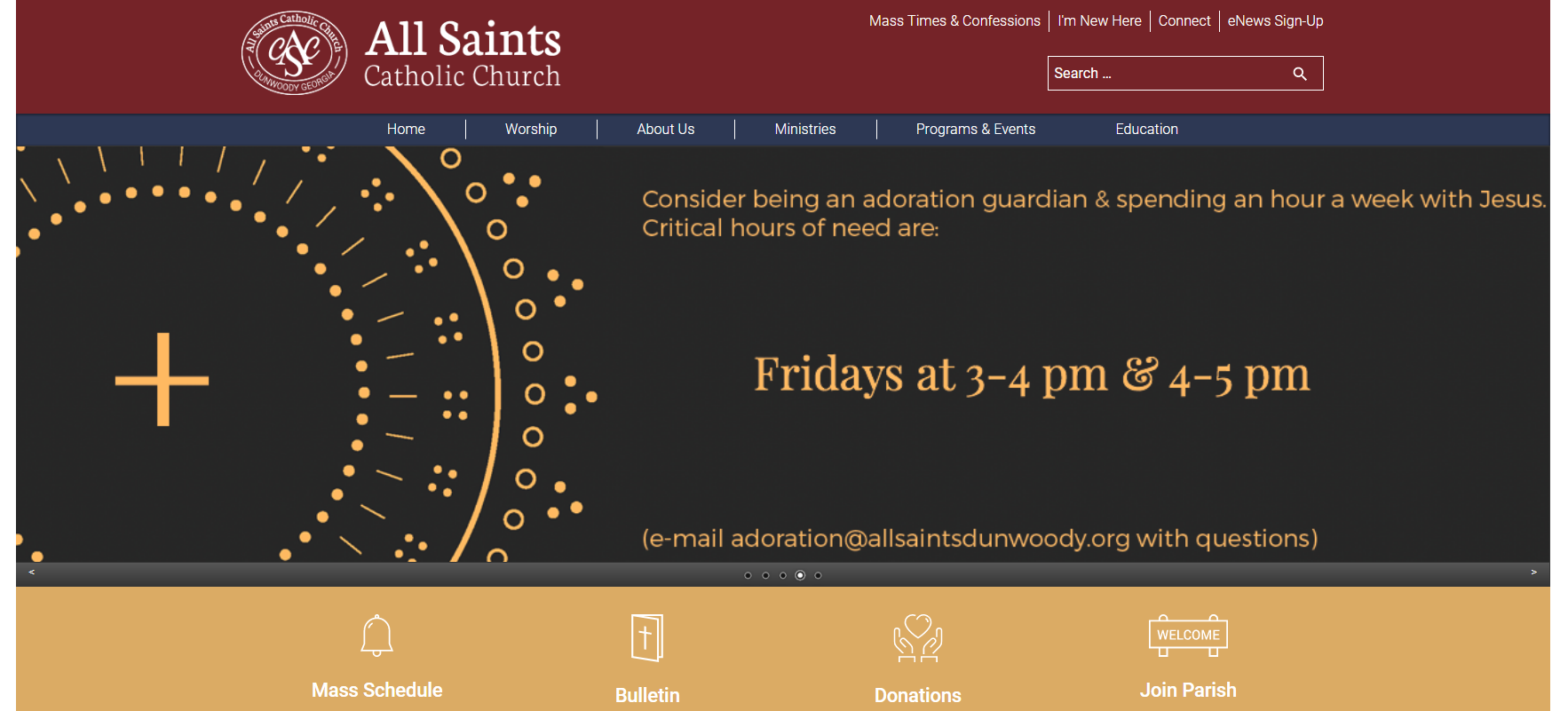
I think one of these two may be our perfect solution!
Veronica Alvarado
Web Department, Diocesan
877-923-0777
877-923-0777
Beth McTighe
I like the bottom bar with the dots in the center. That appears when you mouse over the slider image?
Veronica Alvarado
Yes ma'am, it does.
I just set it to the bottom bar so you can see it in action.
I just set it to the bottom bar so you can see it in action.
Veronica Alvarado
Web Department, Diocesan
877-923-0777
877-923-0777
Beth McTighe
Okay, let’s go with that one. Thanks for figuring that out.
Beth
Beth
Veronica Alvarado
No problem.
As both a Catholic parishioner myself, and a part of Diocesan's web department, I love helping parishes find exactly what they are looking for, for their websites. Once websites work correctly, they are not only visually appealing, but organized in a way that parishioners/visitors feel welcomed and an integral part of their parish community.
By the end of the week, we should have that page title changed and if/when you get approval to change the page title section, let us know and we can get started on that!
Have a wonderful day, Beth.
As both a Catholic parishioner myself, and a part of Diocesan's web department, I love helping parishes find exactly what they are looking for, for their websites. Once websites work correctly, they are not only visually appealing, but organized in a way that parishioners/visitors feel welcomed and an integral part of their parish community.
By the end of the week, we should have that page title changed and if/when you get approval to change the page title section, let us know and we can get started on that!
Have a wonderful day, Beth.
Veronica Alvarado
Web Department, Diocesan
877-923-0777
877-923-0777
Beth McTighe
I have a new question. I would like a custom URL for the preschool: allsaintsdunwoody.org/Preschool
I’m only able to edit the last part of the permalink on the About the Preschool page, so the shortest URL was allsaintsdunwoody.org/Education/ Preschool-at-all-saints/Preschool
To get around this, I created a private page (allsaintsdunwoody.org/Preschool) that automatically redirects to the About the Preschool page. But I can’t find how to automatically reroute a page. Is this possible?
Thanks,
Beth
I’m only able to edit the last part of the permalink on the About the Preschool page, so the shortest URL was allsaintsdunwoody.org/Education/ Preschool-at-all-saints/Preschool
To get around this, I created a private page (allsaintsdunwoody.org/Preschool) that automatically redirects to the About the Preschool page. But I can’t find how to automatically reroute a page. Is this possible?
Thanks,
Beth
Veronica Alvarado
Beth,
It is possible, but only through the use of a plugin which is fairly easy to set up. Now, since it is a plugin, it will cost ~$10 for us to install the plugin and set it up to work the way you would like. Granted, this is quicker/less expensive than us building a brand new section to choose a redirect, but it is still up to you.
It would allow you to redirect any page you create, so in this case, if anyone visited allsaintsdunwoody.org/preschool it would immediately reroute to allsaintsdunwoody.org/Education/Preschool-at-all-saints/Preschool.
Is this something you would be interested in?
Veronica Alvarado
Web Department, Diocesan
877-923-0777
877-923-0777
Beth McTighe
Yes, I feel comfortable with that price. This is something we will use quite often. If it goes beyond $20, please let me know.
Thanks,
Beth
Thanks,
Beth
Veronica Alvarado
Sure thing.
I will work on this now.
I will work on this now.
Veronica Alvarado
Web Department, Diocesan
877-923-0777
877-923-0777
Veronica Alvarado
Beth,
I have added the plugin and changed Preschool to public, so that anyone that goes to /preschool will be redirected to the actual preschool page.
Here is what the plugin looks like when editing a page:
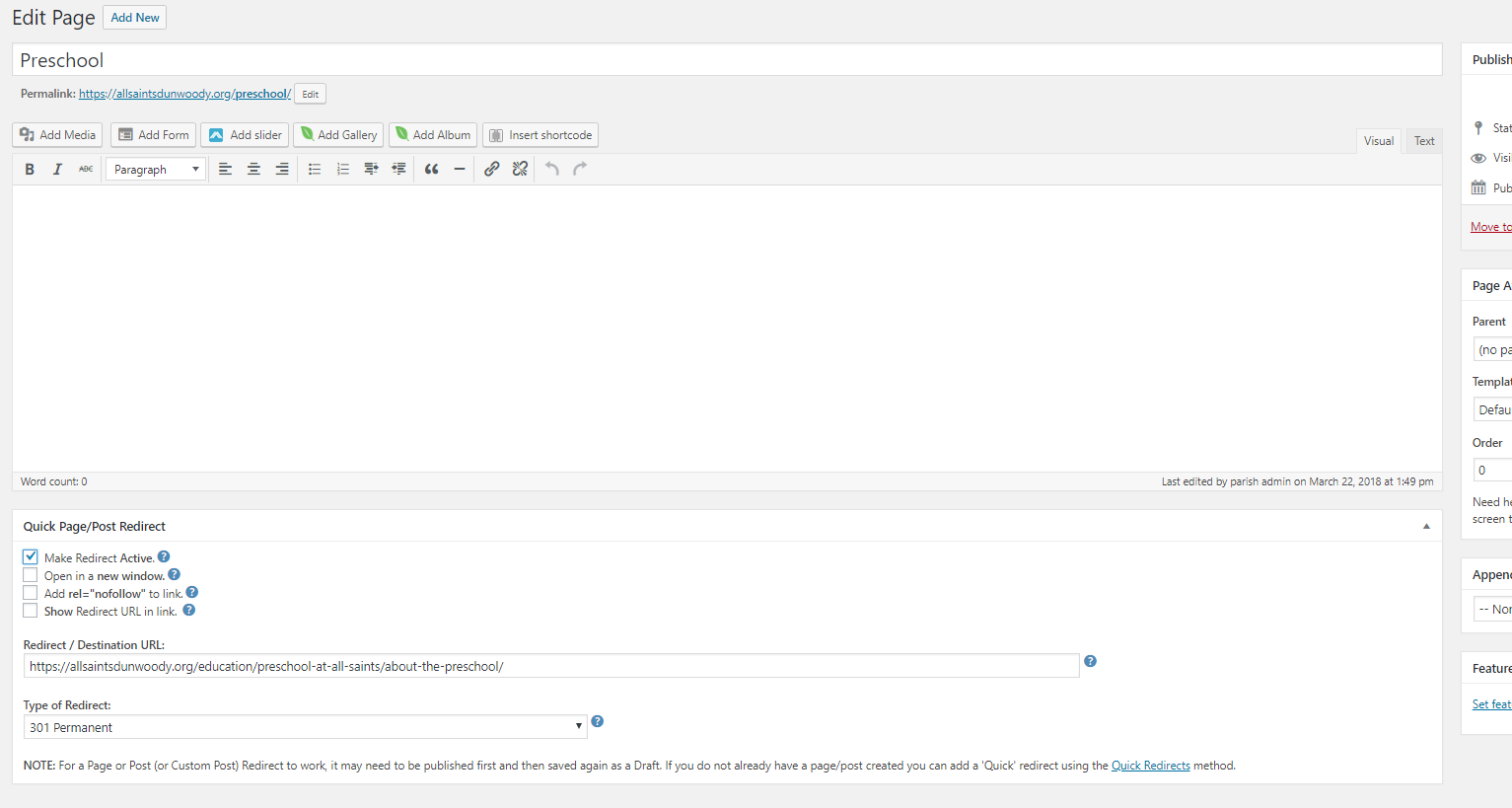
The option to redirect now shows up on each page, when editing.
To make the page redirect, simply check "Make Redirect Active" and place the link in. Then just update/publish the page.
Thank you,
I have added the plugin and changed Preschool to public, so that anyone that goes to /preschool will be redirected to the actual preschool page.
Here is what the plugin looks like when editing a page:
The option to redirect now shows up on each page, when editing.
To make the page redirect, simply check "Make Redirect Active" and place the link in. Then just update/publish the page.
Thank you,
Veronica Alvarado
Web Department, Diocesan
877-923-0777
877-923-0777
Beth McTighe
That is great. Another problem solved. Thanks so much,
Beth
Beth
Beth McTighe
Hello Veronica,
We have been running our digital signage from a web page on our old website. We upload slides to the page and they rotate. Would it be possible to get a blank template? That way, our signs don’t have the website navigation showing above our announcements.
Beth McTighe
We have been running our digital signage from a web page on our old website. We upload slides to the page and they rotate. Would it be possible to get a blank template? That way, our signs don’t have the website navigation showing above our announcements.
Beth McTighe
Veronica Alvarado
Beth,
I am afraid I do not understand. Are you saying you want to get rid of the slider on your new homepage, or you want the ability to have sliders in the content of other pages?
If you think it will take a little more than an email to explain, please give me a call.
Veronica Alvarado
Web Department, Diocesan
877-923-0777
877-923-0777
Veronica Alvarado
Beth,
I believe we found a fairly quick way to do it, but there will be an estimated $15 cost. The template would hide everything but the page content (think blank page with only the slider).
Does this work for you?
Veronica Alvarado
Web Department, Diocesan
877-923-0777
877-923-0777
Beth McTighe
It sounds like it will. Let’s try it.
Beth
Beth
Veronica Alvarado
Beth,
Wonderful, because one of our developers started working on it as soon as we hung up! We created a page called: ASCC TV and set the template to Projector.
Let me know what you think.
Veronica Alvarado
Web Department, Diocesan
877-923-0777
877-923-0777
Veronica Alvarado
Beth McTighe
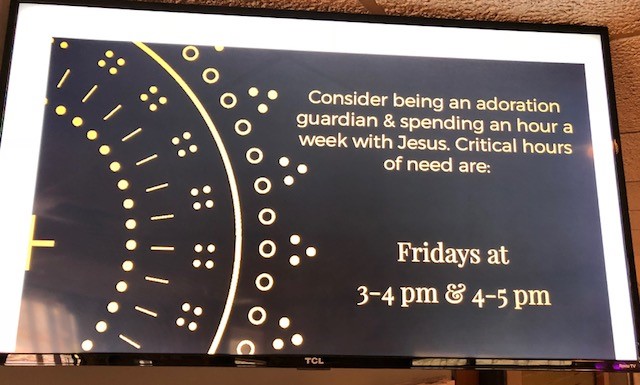
The page works just like I’d hoped. It has a lot of white space around the top and sides. Is there any way to minimize that extra space? I can send a pic to show you.
Beth
Beth
Beth McTighe
Here’s a picture of the screen attached.
Beth
Beth
Veronica Alvarado
Thank you.
Also, do you have the link to the page on your old website? That way we can get a better idea of how it works.
I am not sure there is a way to get rid of the sides, but we should be able to get rid of the padding (the white right along the slideshow.
Also, do you have the link to the page on your old website? That way we can get a better idea of how it works.
I am not sure there is a way to get rid of the sides, but we should be able to get rid of the padding (the white right along the slideshow.
Veronica Alvarado
Web Department, Diocesan
877-923-0777
877-923-0777
Beth McTighe
Beth McTighe
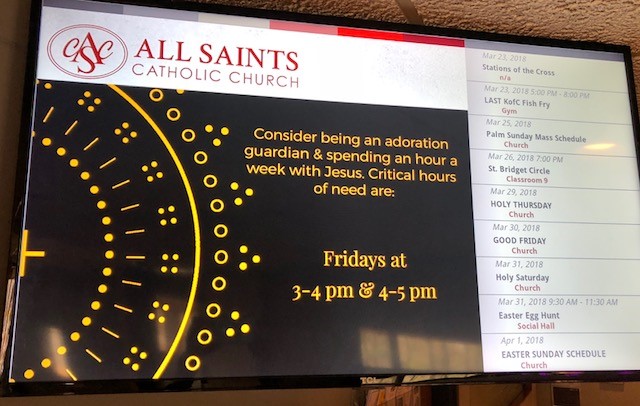
I don’t know if you can see the pictures on the link, so I took a picture of the screen with the link below streaming. It’s attached.
Beth
Beth
Veronica Alvarado
Beth,
Try the page now. We removed as much of the white space as we could.
Also, I am not sure if we would be able to add that calendar that you currently have on the old one. Implementing the calendar to the side would take more time than what we have created.
Veronica Alvarado
Web Department, Diocesan
877-923-0777
877-923-0777
Beth McTighe
I’ll put the calendar on my wish list for later. It’s not necessary. It’s a lot better. There is only about an inch of white space left at the top so I’ll try to change the TV settings to minimize that.
Beth
Beth
Veronica Alvarado
Beth,
Alrighty. Also, I see what you are saying about the white inch at the top, but that white spot does not appear on the Fish Fry image, so I wonder if it is an issue with the side of the image, or the dimensions of the slider. You may want to check that out.
If there is anything else, simply let us know.
Veronica Alvarado
Web Department, Diocesan
877-923-0777
877-923-0777
Beth McTighe
I noticed that too about the fish fry slide. They are all cut off the bottom so we need to change dimensions anyway. I’ll test different sizes.
What will it take to reroute allsaints.us to the new site? I think I’ll be ready soon.
Beth McTighe
All Saints Catholic Church
allsaintsdunwoody.org
What will it take to reroute allsaints.us to the new site? I think I’ll be ready soon.
Beth McTighe
All Saints Catholic Church
allsaintsdunwoody.org
Veronica Alvarado
The rerouting is a Michael question, and he will be out of the office until Monday.
I will leave a note on his desk to look into that and get back to you.
I will leave a note on his desk to look into that and get back to you.
Veronica Alvarado
Web Department, Diocesan
877-923-0777
877-923-0777
Beth McTighe
Okay, thanks for your help today. Have a nice weekend.
Beth
Beth
Veronica Alvarado
Of course and thank you. I hope you have a wonderful weekend as well.
Veronica Alvarado
Web Department, Diocesan
877-923-0777
877-923-0777
Beth McTighe
Beth McTighe has shared OneDrive for Business files with you. To view them, click the links below.
[icon]
allsaints-2tone-rgb-dbloval.jpg<https://allsaintscc-my.sharepoint.com/:i:/g/personal/btravers_allsaintsdunwoody_org/EdYxcOOV-8dBtUDLrYnB5VIBaO48tmqSCOEf9J-Fk6UjxA>
[icon]
IMG_6412.jpg<https://allsaintscc-my.sharepoint.com/:i:/g/personal/btravers_allsaintsdunwoody_org/EaEpv-WqrWNOkDUzsRaNACIBmOOhx73n3NG9Y35IM3YaVA>
Hi Veronica,
Hoping you all can help us with a few items we're having trouble with on allsaintsdunwoody.org.
1. Improved homepage calendar - Still having a lot of trouble with our calendar. Is there a better option for us here? We are considering calendarwiz.com. Is there a better plug-in or other 3rd party that other parishes use?
1. Changing Featured Image - I believe this is a plugin you've hidden from us. Would you mind giving us access to do so ourselves? Or if not, could you swamp the existing one with the attached (I may need to swamp this again soon).
2. Favicon - Is it possible to add one to our site that is our logo? (attached)
1. Is there another way to contact Diocesan about web questions? I work with a remote employee and would like for her to be able to contact Diocesan with questions like these. Her name is Bennett Travers, and her email is btravers@allsaintsdunwoody.org<mailto:btravers@allsaintsdunwoody.org>. She was not able to get these questions through to anyone at Diocesan.
If I need to contact someone else about these items, please let me know.
Best,
Beth McTighe


[icon]
allsaints-2tone-rgb-dbloval.jpg<https://allsaintscc-my.sharepoint.com/:i:/g/personal/btravers_allsaintsdunwoody_org/EdYxcOOV-8dBtUDLrYnB5VIBaO48tmqSCOEf9J-Fk6UjxA>
[icon]
IMG_6412.jpg<https://allsaintscc-my.sharepoint.com/:i:/g/personal/btravers_allsaintsdunwoody_org/EaEpv-WqrWNOkDUzsRaNACIBmOOhx73n3NG9Y35IM3YaVA>
Hi Veronica,
Hoping you all can help us with a few items we're having trouble with on allsaintsdunwoody.org.
1. Improved homepage calendar - Still having a lot of trouble with our calendar. Is there a better option for us here? We are considering calendarwiz.com. Is there a better plug-in or other 3rd party that other parishes use?
1. Changing Featured Image - I believe this is a plugin you've hidden from us. Would you mind giving us access to do so ourselves? Or if not, could you swamp the existing one with the attached (I may need to swamp this again soon).
2. Favicon - Is it possible to add one to our site that is our logo? (attached)
1. Is there another way to contact Diocesan about web questions? I work with a remote employee and would like for her to be able to contact Diocesan with questions like these. Her name is Bennett Travers, and her email is btravers@allsaintsdunwoody.org<mailto:btravers@allsaintsdunwoody.org>. She was not able to get these questions through to anyone at Diocesan.
If I need to contact someone else about these items, please let me know.
Best,
Beth McTighe
Veronica Alvarado
Hello Beth,
I'm so sorry you seem to be having issues. Let's see what we can do to help!
- We have worked with another parish that uses CalendarWiz.
https://scosparish.org/
If you click on their "Full Calendar" button, it takes you to their full CalendarWiz page.
Unfortunately, they display their calendar vertically, not horizontally, as you currently do. If you would like, I can take a look at their display setting and see if there is a way to display it horizontally. - I have set the default featured image to be changed by you.
- Go to Settings > Media in the Dashboard
- Click Select default featured image
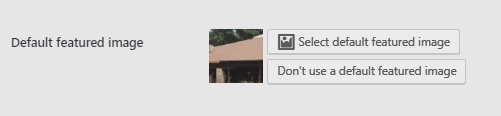
- Select the new image you would like to use from your media library
- Click Set default featured image

- Click Save Changes to save any change that you have made.
- Yes, we can add that favicon.
- Please contact our Web Department for support at webdepartment@diocesan.com. Please keep in mind that support calls and training are subject to a $50/hr, prorated fee.
Thank you,
Veronica Alvarado
Content Specialist
Web Department, Diocesan
877-923-0777
Web Department, Diocesan
877-923-0777
Veronica Alvarado
Could you please send your logo for the favicon again? The links did not allow me to open the file.
Thank you,
Thank you,
Veronica Alvarado
Content Specialist
Web Department, Diocesan
877-923-0777
Web Department, Diocesan
877-923-0777
Beth McTighe
Attached is the favicon logo.
Beth

Beth
Veronica Alvarado
Sorry to be such a bother, but could you please send this image as a .gif or .png file type? Favicons have to be either a .gif or .png for us to change it into a .ico (icon) file.
Thank you, Beth.
Thank you, Beth.
Veronica Alvarado
Content Specialist
Web Department, Diocesan
877-923-0777
Web Department, Diocesan
877-923-0777
Beth McTighe
Will this work?

Veronica Alvarado
Yes, ma'am!
Thank you,
Thank you,
Veronica Alvarado
Content Specialist
Web Department, Diocesan
877-923-0777
Web Department, Diocesan
877-923-0777
Beth McTighe
Is there another calendar plug-in that doesn’t lose it’s columns so easily? At least a few times a week we have the alignment of the columns completely off and we don’t care for the look or functionality of the full calendar page either. Is there anything else your clients use?
Beth
Beth
Veronica Alvarado
We have had several organzations use EventON for their calendar. This calendar would be entirely based within your website. It has many views, with the most popular being the tile view (as seen here: https://dioceseofvenice.org/offices/daily-resources/calendar/)
However, for EventOn, it is a one-time fee of $24 for plugin and another $35 to install, set up, and train you over how the plugin works.
Here is a link to more information: https://www.myeventon.com/
The downfall of this plugin is that it does not allow you to display a week's worth of events, like you are trying to accomplish. Instead, it displays upcoming events either in a list, or as tiles that go across.
Here are the different views: https://demo.myeventon.com/
Quite honestly, we try to stay away from displaying a whole day's events on the homepage. Instead, we typically make it display each event separately, similar to the calendar at the bottom of this site: https://olmercy.com/
Also, we have gone ahead and added the favicon for your website.
Thank you,
However, for EventOn, it is a one-time fee of $24 for plugin and another $35 to install, set up, and train you over how the plugin works.
Here is a link to more information: https://www.myeventon.com/
The downfall of this plugin is that it does not allow you to display a week's worth of events, like you are trying to accomplish. Instead, it displays upcoming events either in a list, or as tiles that go across.
Here are the different views: https://demo.myeventon.com/
Quite honestly, we try to stay away from displaying a whole day's events on the homepage. Instead, we typically make it display each event separately, similar to the calendar at the bottom of this site: https://olmercy.com/
Also, we have gone ahead and added the favicon for your website.
Thank you,
Veronica Alvarado
Content Specialist
Web Department, Diocesan
877-923-0777
Web Department, Diocesan
877-923-0777