




Development Link & Training
Good afternoon Kristin & Fr. Scott,
We have reached the point in development at which we share a link to the development site with you.
Training Sessions
The first training session typically takes ~2 hours and is done remotely via a screen share program. We will send over the meeting link and phone number in a later email.
During the training sessions, we go over:
- How to edit the homepage content
- How to edit the footer
- How to edit the menu
- How to create/edit inner pages
- How to create/edit posts
- How to create/edit image galleries
- How to create/edit online forms
Since this can be a lot, we break the training down into two sessions:
Session 1: Editing the site basics
Session 2: Editing the additional site features & answering follow-up questions
This is completely up to your learning pace and how much you feel comfortable covering at once.
Development Site Link
Something to keep in mind is that the site is not quite completed yet, with the largest thing being mobile responsiveness. That said, it is best to look at the development site on a desktop computer, rather than a laptop or smaller screen. Mobile development/responsiveness is something that the developer completes after the training so that he can update any changes along with the original development!
There are some other big items that we are still working on, such as:
- A Journey Through The Mass Page PDF Flipbook
- This page on the current site has way too much content on it and I tried to format it a little bit better by making paragraphs and adding some spaces here and there. I made it into a Google Doc (Link Here) so that you can edit it. If you want to edit it more, feel free then print it to a PDF and we can change out the flipbook later on (if we can get the plugin to work and if you format the Google Doc differently). Right now, I have it linked at the top as a back-up
Other than that, if you see anything that alarms you (design or functionality), please let me know and we can address your concerns.
Development Site URL: https://allsaints.diocesanweb.org/
Please let us know what dates and times work best for the training or if you have any other questions,
Cody Armock
Web Content Specialist, Web Department
877-923-0777
 Cody Armock
I forgot to link the Journey through the Mass Google Doc, so here it is: https://docs.google.com/document/d/104VLkX_8-71jndP3jM35tOJwfbF-khvjIoioBZ0Scic/edit?usp=sharing
Sorry about that!
Cody Armock
Sorry about that!
Cody Armock
Web Department, Diocesan
877-923-0777
 Kristin Carriveau
Hi Cody,
Do you suggest having more than one person to sit in on the training? Is this recorded for future use?
Kristin

Do you suggest having more than one person to sit in on the training? Is this recorded for future use?
Kristin
Cody Armock
Hello Kristin,
I recommend having anyone that will be updating the website sit in on the training. I will record both trainings and send them to you after the training via Google Drive and from there you can download them and have them for the future.
Let me know what time(s) work for the first training!
Thank you,
Cody Armock
I recommend having anyone that will be updating the website sit in on the training. I will record both trainings and send them to you after the training via Google Drive and from there you can download them and have them for the future.
Let me know what time(s) work for the first training!
Thank you,
Cody Armock
Web Department, Diocesan
877-923-0777
Kristin Carriveau
Are you available for the training this week, or will it be into next week before you’re available?

Cody Armock
Hello Kristin,
I am available after 10 am tomorrow, otherwise, it would have to be next week!
Cody Armock
I am available after 10 am tomorrow, otherwise, it would have to be next week!
Cody Armock
Web Department, Diocesan
877-923-0777
Kristin Carriveau
Let’s schedule next week. What is your availability?

Cody Armock
Hello Kristin,
Monday - Thursday I am available after 10 am and before 4 pm (meaning last training would start at 2 pm). Friday, I am available after 10 am and before 3pm (meaning last training would start at 1 pm)
Let me know what time works best for you!
Cody Armock
Monday - Thursday I am available after 10 am and before 4 pm (meaning last training would start at 2 pm). Friday, I am available after 10 am and before 3pm (meaning last training would start at 1 pm)
Let me know what time works best for you!
Cody Armock
Web Department, Diocesan
877-923-0777
Kristin Carriveau
Hi Cody,
I can schedule a time to train with you this week if you are available. I am most often available between 10 am and 2 pm.
I have also made some notes on the new website build for editing purposes.
On the homepage, the top bar:
1. Can the color and the opaqueness be easily adjusted as needed, or is it set to the same thing all of the time?
2. The bar looks too chunky, can you shrink it up a bit? Instead of a full inch wide, shrink it down to ¾”.
The 4 colored buttons are also a bit too chunky. Could those get shrunk down to and inch to an inch and a quarter instead of almost 2 inches? Are those editable as well (if we end up having to change what they are used for in the future)? We are in a bit of a transition period right now, as our priests are being reassigned in June, and we will be getting a new one then as well. So I am unsure if he will want to make any changes in how we use the website.
At the bottom of the page under “Find Us” you can remove the cross for MassPas. Is there a way to add something there for the myparish app and Flocknote?
Under Join Us at Mass, View Full Schedule, Mass needs to be capitalized under Wednesday. (I am assuming I will learn how to do that kind of editing, but I happened to see that while looking. Also, could you add another piece for Eucharistic Adoration, as we have minimal time at our main campus, put have Perpetual Adoration at one of our other campuses. It this something that I will also learn how to add/delete as needed?
Under the ministries, the listing of the Liturgical Ministries works out the way it is set up, but the same format doesn’t translate well for the Parish Ministries. If that could be set up more like the Faith Formation is with boxes to click on, I think that would tidy it up a bit. The idea for the groups would be that each group would be able to have a page with information, and updates on what their group is doing.
Thank you for your help!
Kristin

I can schedule a time to train with you this week if you are available. I am most often available between 10 am and 2 pm.
I have also made some notes on the new website build for editing purposes.
On the homepage, the top bar:
1. Can the color and the opaqueness be easily adjusted as needed, or is it set to the same thing all of the time?
2. The bar looks too chunky, can you shrink it up a bit? Instead of a full inch wide, shrink it down to ¾”.
The 4 colored buttons are also a bit too chunky. Could those get shrunk down to and inch to an inch and a quarter instead of almost 2 inches? Are those editable as well (if we end up having to change what they are used for in the future)? We are in a bit of a transition period right now, as our priests are being reassigned in June, and we will be getting a new one then as well. So I am unsure if he will want to make any changes in how we use the website.
At the bottom of the page under “Find Us” you can remove the cross for MassPas. Is there a way to add something there for the myparish app and Flocknote?
Under Join Us at Mass, View Full Schedule, Mass needs to be capitalized under Wednesday. (I am assuming I will learn how to do that kind of editing, but I happened to see that while looking. Also, could you add another piece for Eucharistic Adoration, as we have minimal time at our main campus, put have Perpetual Adoration at one of our other campuses. It this something that I will also learn how to add/delete as needed?
Under the ministries, the listing of the Liturgical Ministries works out the way it is set up, but the same format doesn’t translate well for the Parish Ministries. If that could be set up more like the Faith Formation is with boxes to click on, I think that would tidy it up a bit. The idea for the groups would be that each group would be able to have a page with information, and updates on what their group is doing.
Thank you for your help!
Kristin
Cody Armock
Good Afternoon Kristin,
- The white header bar will have the same opaqueness and color everywhere and can only be changed in the code. We made it match the proofs that Danae sent to you.
- Before making these changes, please make sure that you are not zoomed in or anything in your browser. Also, something to note is that these elements will look different based on the different screen sizes used i.e. desktop vs laptop vs tablet & phone.
- We can still go through and make these changes though if you would like after checking those things.
- The 4 colored buttons are completely editable and can be changed whenever you like. There are a max of 6 of these buttons, so you can add more if you'd like too.
- I have removed the Masspas cross and have made a to-do for the myparish app icon to show here. We use a system called font-awesome for the logos, so I used the closest thing to flocknote here, but do note that it is also linked in the actual quick links to the left of it as well.
- I have capitalized "Mass" under Wednesday and have added a piece for perpetual adoration. These can, of course, be changed later and we will go through that in training.
- I have shifted the Parish Groups page over to the Faith Formation style. They are just gray buttons right now, but in training, I will show you how to add images to those buttons. I just didn't want it to have to be done twice.
As for the training, I could do Thursday, this week anytime between 10am and 4pm. Let me know what time works best for you in that stretch.
Thank you,
Cody Armock
Thank you,
Cody Armock
Web Department, Diocesan
877-923-0777
Kristin Carriveau
Good Morning Cody,
Thank you for all of the changes, and explanations you sent. It is helpful to know what edits that we make on our end, and what is sent in code.
The changes to the Parish Groups page looks really good! So much cleaner, and easier to find what users may be looking for.
I went back to look at the proof for the scaling of the menu bar, picture, and the buttons on the homepage, and they are off from the proof that Danae sent. I
Here is the link to that proof: https://xd.adobe.com/view/81d7b094-4910-41d5-8b3c-30be64cace88-d484/
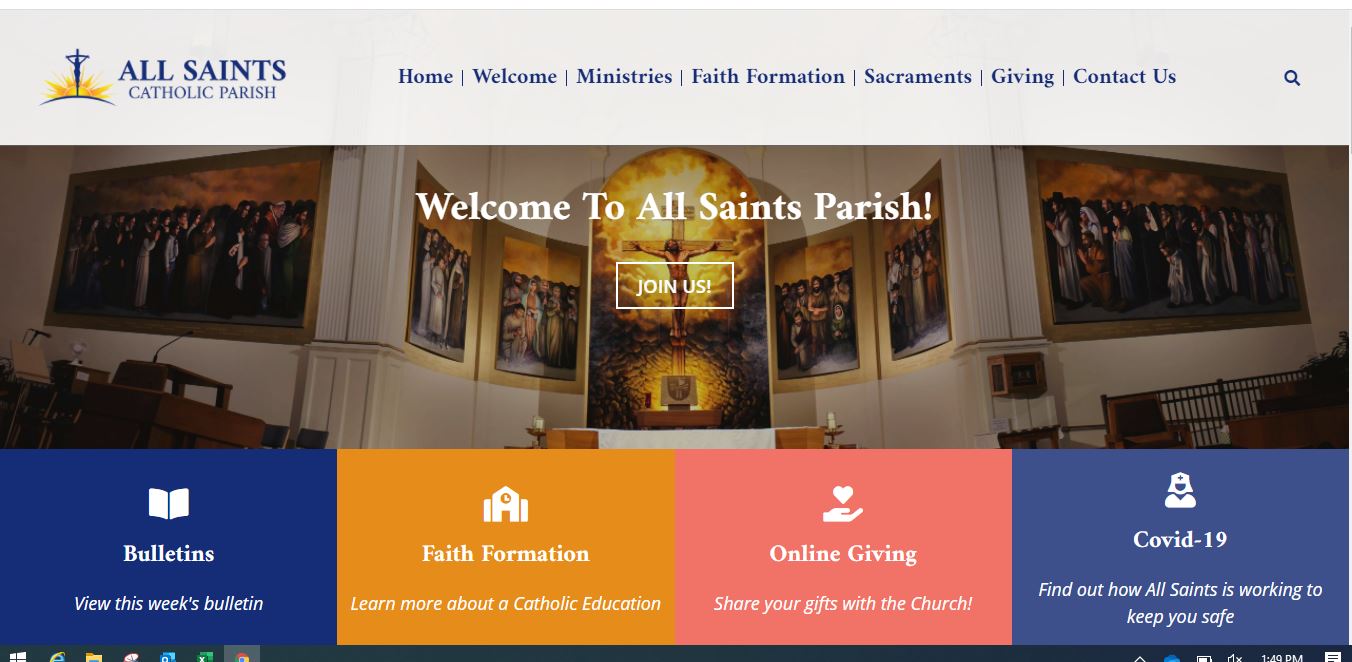
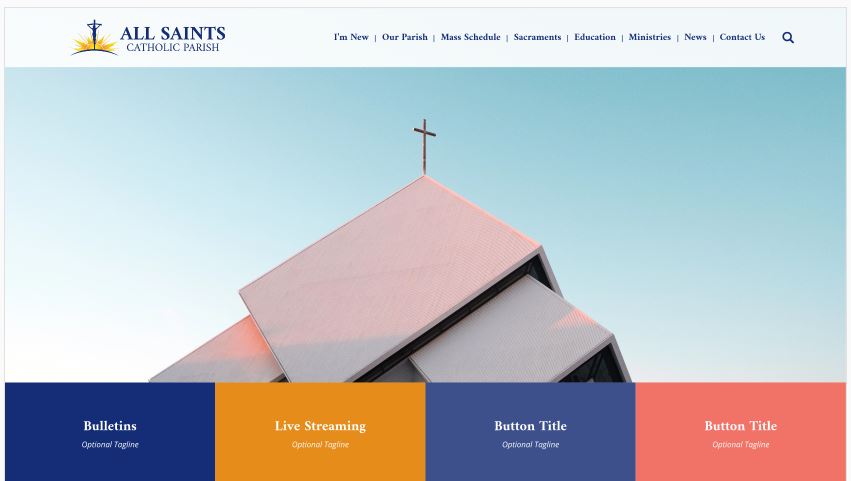
The proof had roughly these percentages on the initial screen (before scrolling): Bar – 11% Picture – 67% Buttons – 22%
It now has roughly these percentages of the screen (before scrolling): Bar – 22% Picture – 45% Buttons – 33%
It does make a big difference in the visual look of the page.
Under the Find Us, I think keeping it to the Facebook, YouTube, and MyParishApp is best. (We don’t have Evangelus, and Flocknote is, as you pointed out, in the column next to it.)
Unfortunately, I will not be available at all on Thursday (tomorrow). I am available Friday between 10 and 2, and then next week the same time frame each day. What might work for you?
Thank you,
Kristin

Thank you for all of the changes, and explanations you sent. It is helpful to know what edits that we make on our end, and what is sent in code.
The changes to the Parish Groups page looks really good! So much cleaner, and easier to find what users may be looking for.
I went back to look at the proof for the scaling of the menu bar, picture, and the buttons on the homepage, and they are off from the proof that Danae sent. I
Here is the link to that proof: https://xd.adobe.com/view/81d7b094-4910-41d5-8b3c-30be64cace88-d484/
The proof had roughly these percentages on the initial screen (before scrolling): Bar – 11% Picture – 67% Buttons – 22%
It now has roughly these percentages of the screen (before scrolling): Bar – 22% Picture – 45% Buttons – 33%
It does make a big difference in the visual look of the page.
Under the Find Us, I think keeping it to the Facebook, YouTube, and MyParishApp is best. (We don’t have Evangelus, and Flocknote is, as you pointed out, in the column next to it.)
Unfortunately, I will not be available at all on Thursday (tomorrow). I am available Friday between 10 and 2, and then next week the same time frame each day. What might work for you?
Thank you,
Kristin
Cody Armock
Good Afternoon Kristin,
I believe that I have fixed the header, the slider, and the featured buttons size to make it more like the proof.
I have also removed the Evangelus and the Flocknote from the social icons.
In terms of training, Friday does not work for me. As of right now, I can do 10 am - 12 pm any time next week Monday - Friday. Monday and Wednesday I can do anytime between 10 am and 2 pm.
Let me know what works for you!
Cody Armock
I believe that I have fixed the header, the slider, and the featured buttons size to make it more like the proof.
I have also removed the Evangelus and the Flocknote from the social icons.
In terms of training, Friday does not work for me. As of right now, I can do 10 am - 12 pm any time next week Monday - Friday. Monday and Wednesday I can do anytime between 10 am and 2 pm.
Let me know what works for you!
Cody Armock
Web Department, Diocesan
877-923-0777
Kristin Carriveau
Hi Cody,
Thank you for your response. The “Find Us” looks great.
I attached pictures of the 2 different images of the homepage. This how they visually differ in proportions as they show on my laptop.
Let’s shoot for Wednesday next week.
Kristin

Thank you for your response. The “Find Us” looks great.
I attached pictures of the 2 different images of the homepage. This how they visually differ in proportions as they show on my laptop.
Let’s shoot for Wednesday next week.
Kristin
Cody Armock
Hello Kristin,
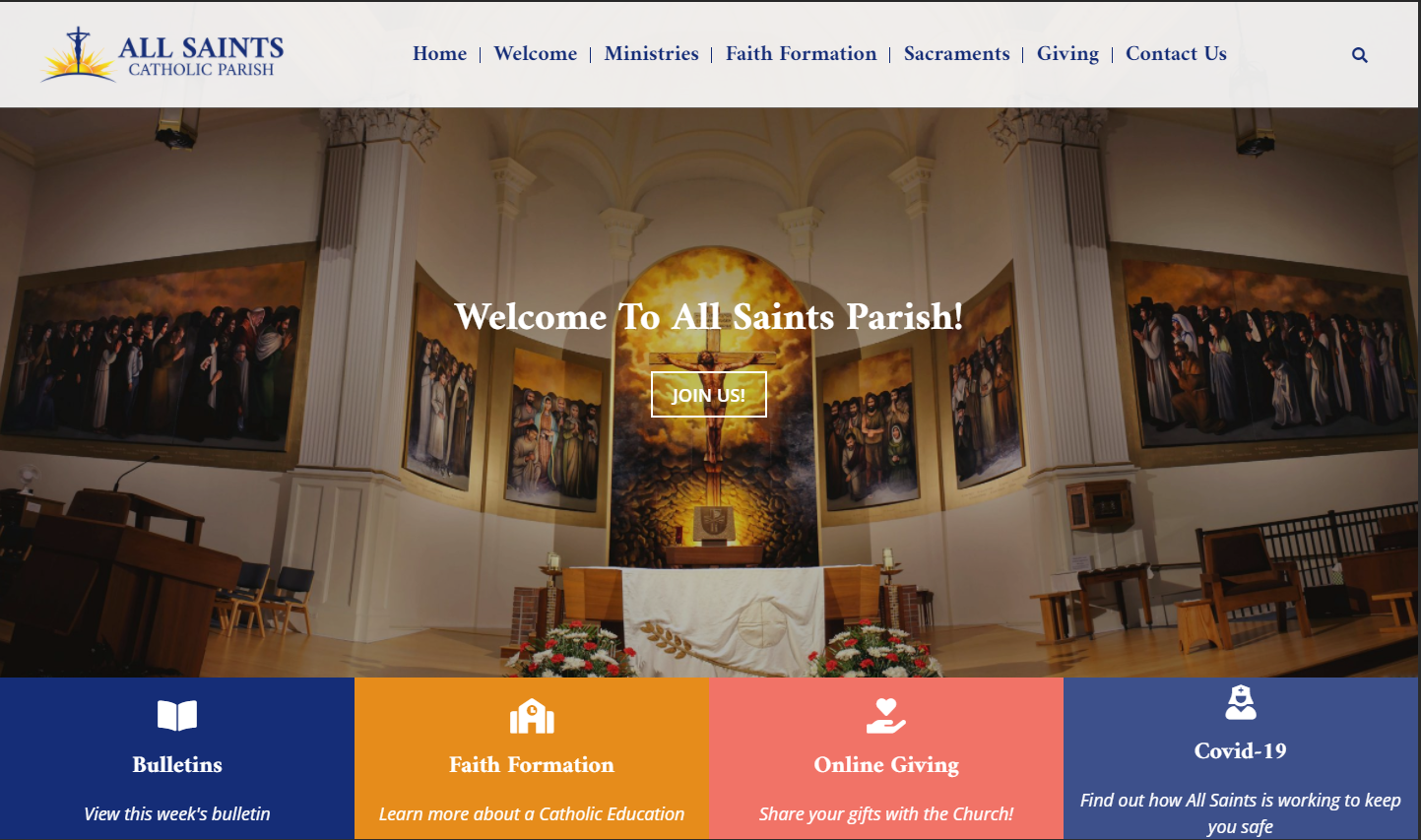
I forgot to tell you to do a hard-refresh which should bring in the new changes. (Instructions on how to hard-refresh here). It should look closer to what is shown below.
What time next Wednesday for the training?
Cody Armock
I forgot to tell you to do a hard-refresh which should bring in the new changes. (Instructions on how to hard-refresh here). It should look closer to what is shown below.
What time next Wednesday for the training?
Cody Armock
Web Department, Diocesan
877-923-0777
Kristin Carriveau
Good Morning Cody,
The hard refresh did the trick! I should have thought of that as well. Thanks for the help.
How does 10 o’clock work for you?
Kristin

The hard refresh did the trick! I should have thought of that as well. Thanks for the help.
How does 10 o’clock work for you?
Kristin
Cody Armock
Good Morning Kristin,
Here is the meeting information for next week Wednesday's Training at 10 am:
Diocesan is inviting you to a scheduled Zoom meeting.
Topic: First Training | All Saints (Alpena, MI)
Time: May 5, 2021 10:00 AM Eastern Time (US and Canada)
Join Zoom Meeting
https://us02web.zoom.us/j/86766203150
Meeting ID: 867 6620 3150
Let me know if you have any questions!
Cody Armock
Web Department, Diocesan
877-923-0777
Kristin Carriveau
Hi Cody,
I hope you had a good weekend.
Could you please send along the date/time and log-in info for the next website training?
Thank you,
Kristin
I hope you had a good weekend.
Could you please send along the date/time and log-in info for the next website training?
Thank you,
Kristin
Cody Armock
Good Morning Kristin,
Here is the meeting information for Wednesday:
Diocesan is inviting you to a scheduled Zoom meeting.
Topic: Second Training | All Saints (Alpena, MI)
Time: May 12, 2021 10:00 AM Eastern Time (US and Canada)
Join Zoom Meeting
https://us02web.zoom.us/j/89837063013
Meeting ID: 898 3706 3013
Cody Armock
Here is the meeting information for Wednesday:
Diocesan is inviting you to a scheduled Zoom meeting.
Topic: Second Training | All Saints (Alpena, MI)
Time: May 12, 2021 10:00 AM Eastern Time (US and Canada)
Join Zoom Meeting
https://us02web.zoom.us/j/89837063013
Meeting ID: 898 3706 3013
Cody Armock
Web Department, Diocesan
877-923-0777
Kristin Carriveau
Thank you Cody!

Kristin Carriveau
Hi Cody,
I am so sorry that I got pulled away today. Angie filled me in briefly on what I missed, and got me excited to watch the recording of the training.
She also mentioned you asked about the launch date. I didn’t know how close we were to launching. I have a few items that I will need to find out about before we can go live. We would also like to give a little notice to our parishioners that the site will be changing on a specific date.
I think that our new website was going to the capability to have an optional box that would pop up when you visited the site in case there was something that needed to be announced and not missed (snow day/cancelation). Is this an option? How do I access it?
Right now we use a MassPas button, and sheets to handle our weekend Mass attendance. Will this be able to seamlessly move from the way it is on the current site to the new one?
Thank you for your continued help,
Kristin

I am so sorry that I got pulled away today. Angie filled me in briefly on what I missed, and got me excited to watch the recording of the training.
She also mentioned you asked about the launch date. I didn’t know how close we were to launching. I have a few items that I will need to find out about before we can go live. We would also like to give a little notice to our parishioners that the site will be changing on a specific date.
I think that our new website was going to the capability to have an optional box that would pop up when you visited the site in case there was something that needed to be announced and not missed (snow day/cancelation). Is this an option? How do I access it?
Right now we use a MassPas button, and sheets to handle our weekend Mass attendance. Will this be able to seamlessly move from the way it is on the current site to the new one?
Thank you for your continued help,
Kristin
Cody Armock
Good Afternoon Kristin,
Here is the link to the training recordings: https://drive.google.com/drive/folders/12puR1oz0z4QaCNKzo6NjrP_a_8kR5j0h?usp=sharing
Okay, just let me know when you would like to live. It should be between a Monday and a Thursday to give us another day leeway in case you have any questions.
I have added the Emergency Alert Plugin. You should see it in the Wordpress menu and it should be pretty intuitive. If someone closes it when they get to the homepage then it will add the little bell icon to the left side of the page. Many of the fields are optional, so you don't have to have a picture or text or a link, etc.
I have also added the signup sheets plugin that is on the current site and added the four weekend masses for this coming weekend as examples, it does not have anything filled out, so before the switch, you may want to export everything to a CSV or Excel file for a backup from the current site, but you can start making those new sheets and copying those 4 sheets now and just making the new dates.
I hope this helps, sorry about not having these added earlier!
Cody Armock
Here is the link to the training recordings: https://drive.google.com/drive/folders/12puR1oz0z4QaCNKzo6NjrP_a_8kR5j0h?usp=sharing
Okay, just let me know when you would like to live. It should be between a Monday and a Thursday to give us another day leeway in case you have any questions.
I have added the Emergency Alert Plugin. You should see it in the Wordpress menu and it should be pretty intuitive. If someone closes it when they get to the homepage then it will add the little bell icon to the left side of the page. Many of the fields are optional, so you don't have to have a picture or text or a link, etc.
I have also added the signup sheets plugin that is on the current site and added the four weekend masses for this coming weekend as examples, it does not have anything filled out, so before the switch, you may want to export everything to a CSV or Excel file for a backup from the current site, but you can start making those new sheets and copying those 4 sheets now and just making the new dates.
I hope this helps, sorry about not having these added earlier!
Cody Armock
Web Department, Diocesan
877-923-0777
Kristin Carriveau
Awesome Cody, thank you!
I will get back with you when I know what the target date is.

I will get back with you when I know what the target date is.
Kristin Carriveau
Cody, I am not seeing the sheets plug-in. Where do I find it?

Cody Armock
Hello Kristin,
In the chaos, I forgot to add you as a Sign-up sheet manager, that should now be fixed and you should be able to see that if you refresh the backend of Wordpress.
Thank you,
Cody Armock
In the chaos, I forgot to add you as a Sign-up sheet manager, that should now be fixed and you should be able to see that if you refresh the backend of Wordpress.
Thank you,
Cody Armock
Web Department, Diocesan
877-923-0777
Kristin Carriveau
Thank you Cody.

Kristin Carriveau
Good Morning Cody,
Could you please send the last training recording that covered the gravity forms and gallery? I will need to watch them again, as I was pulled away a few times during the training.
Thank you for your help.
Kristin
Could you please send the last training recording that covered the gravity forms and gallery? I will need to watch them again, as I was pulled away a few times during the training.
Thank you for your help.
Kristin
Cody Armock
Good Morning Kristin,
Here is the link to both recordings in Google Drive. Please remember to download them as we periodically go through and clean out Google Drive.
Thank you,
Cody Armock
Here is the link to both recordings in Google Drive. Please remember to download them as we periodically go through and clean out Google Drive.
Thank you,
Cody Armock
Web Department, Diocesan
877-923-0777
Kristin Carriveau
Thank you Cody, I downloaded them today.